
Not all quote management systems are created equal. Some are glorified spreadsheets that create more work than they save. Others are enterprise-level CPQ platforms that cost $50,000 or more per year and take months to implement.
Most B2B wholesalers on Shopify need something in between: powerful enough to scale, simple enough to use daily. According to Shopify's B2B documentation, B2B merchants need tools that support the longer sales cycles, custom pricing, and negotiation workflows that business buyers expect — and those tools need to work within the Shopify ecosystem, not outside it.
If you are building your first B2B quote workflow, start with the B2B quote management guide for the foundation, then use this checklist to evaluate whether your current system covers all 10 essential features.
Feature 1: Self-Service Quote Request Forms
What it is: Embedded forms on your product pages that let buyers request quotes without calling or emailing.
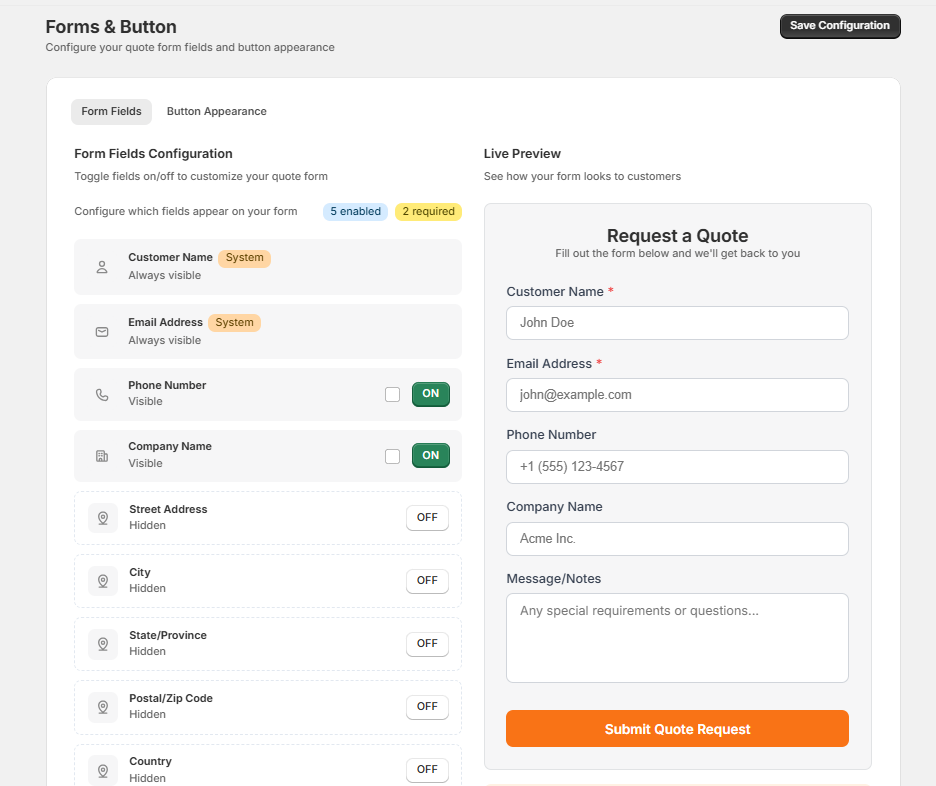
A self-service quote form is the entry point for your entire B2B workflow. Buyers browse your catalog, select the products they need, specify quantities and variants, and submit a structured request — all without leaving your store. The best forms are customizable so you can capture exactly the information your team needs to price accurately: company name, expected volumes, delivery timeline, and special requirements.
Must-have capabilities:
- Customizable form fields with drag-and-drop builder
- Multi-product quote requests from a single submission
- File uploads for specifications, purchase orders, or reference documents
- Mobile-responsive design that works on any device
- Integration with your product catalog so buyers select real products
For stores that want to create a full request-for-quote experience, you can also hide prices on your Shopify store and replace the Add to Cart button with a Request a Quote button across all product pages.
Feature 2: Customer-Specific Pricing
What it is: The ability to set custom pricing for each buyer based on their relationship, volume, or negotiated terms.
B2B pricing is rarely one-size-fits-all. Different buyers get different prices based on their order history, contract terms, geographic location, and strategic importance. Your quote management system needs to support per-customer pricing so you can respond to each request with the right numbers without consulting a spreadsheet.
Must-have capabilities:
- Per-customer price adjustments on individual quote line items
- Volume discount structures with clear tier breakdowns
- Ability to reference previous quotes for pricing consistency
- Payment term customization per buyer
For a deeper look at setting up tiered and segment-based pricing workflows, see the customer-specific pricing on Shopify guide. If you are negotiating prices with wholesale buyers, wholesale price negotiation strategies covers the tactical side.
Feature 3: Quote Status Tracking and Pipeline Management
What it is: A visual dashboard showing all quotes and where they are in your sales process — from initial request through to closed deal.
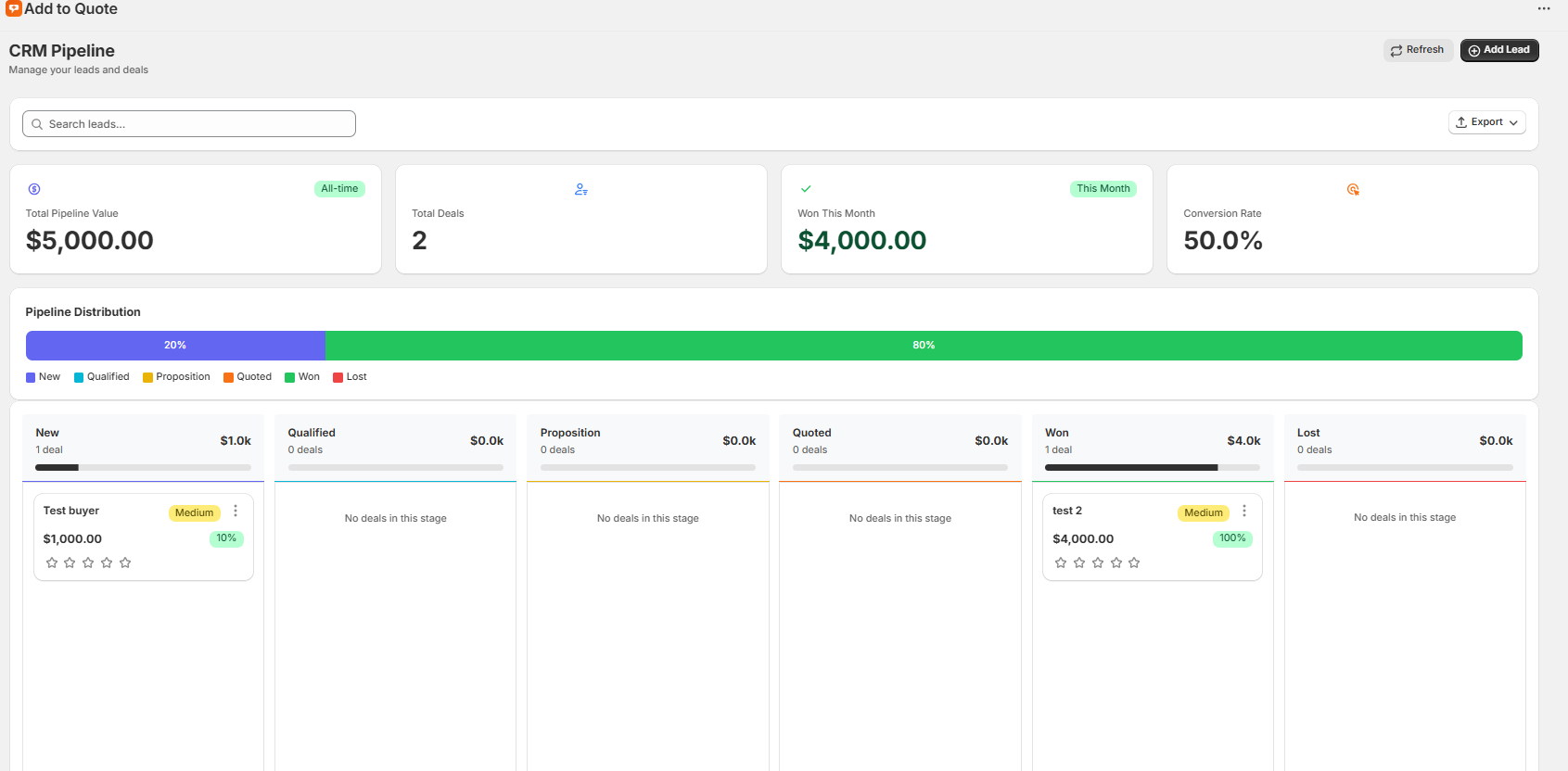
Without pipeline visibility, you cannot tell how many quotes are pending, which deals are stalled, or what your conversion rate looks like. A CRM pipeline with defined stages replaces guesswork with data.
Must-have capabilities:
- Pipeline stages that map to your sales process (New, Qualified, Proposition, Quoted, Won, Lost)
- Kanban board or list view for visual deal tracking
- Total value tracking per stage so you can forecast revenue
- Filtering and search by customer, date, status, or value
- Activity timeline showing every action taken on each quote
Feature 4: One-Click Quote-to-Order Conversion
What it is: The ability to convert an approved quote into a Shopify order without re-entering data.
This is where most manual quoting systems break down. A buyer approves the quote, and then someone on your team has to manually create an order, re-enter every line item, double-check pricing, and hope nothing gets lost in translation. That process takes 10 to 15 minutes per order and introduces errors.
One-click conversion means you click a single button — Create Invoice — and the system generates a Shopify draft order with every product, quantity, custom price, and customer detail transferred automatically. The buyer receives a Shopify invoice they can pay through standard checkout. To learn more about this workflow, see how to convert quotes to Shopify draft orders.
Time savings: From 15 minutes of manual re-entry per order to under 30 seconds.
Feature 5: Automated Follow-Up and Notification System
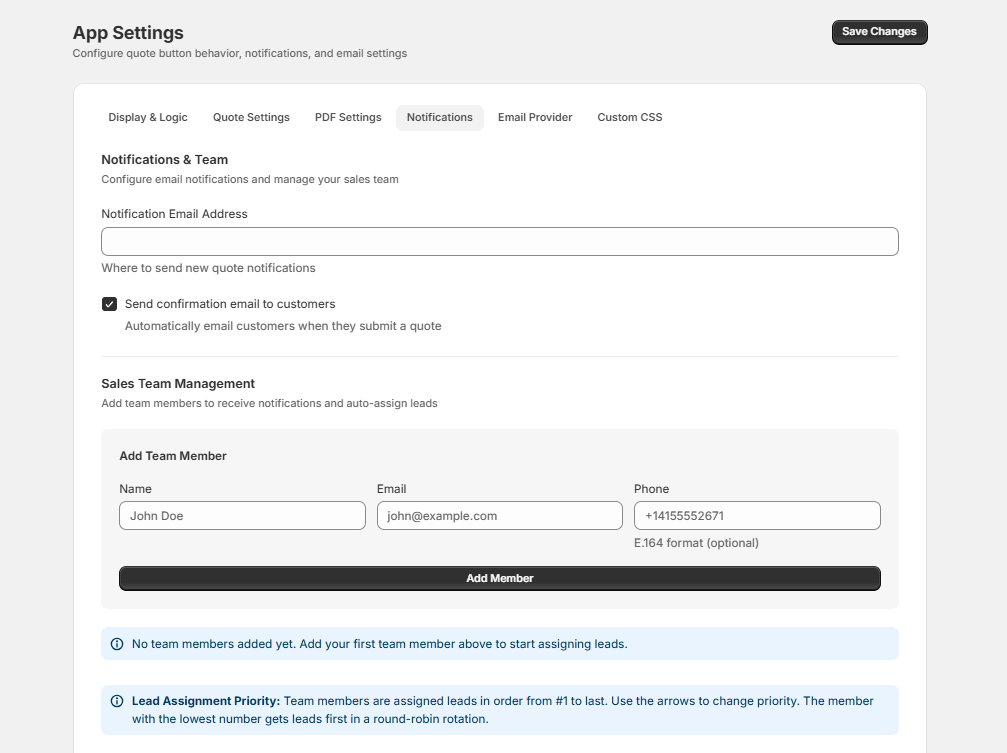
What it is: Multi-channel notifications and scheduled reminders that keep your team and your buyers engaged throughout the quote lifecycle.
60% of B2B buyers say no four times before saying yes. Systematic follow-up is the difference between a 20% and a 40% conversion rate. Your system should notify your team the moment a new quote request comes in, alert the buyer when their quote is ready, and remind both parties when a quote is approaching its expiration date.
Supported email providers:
- AWS SES (default, zero setup)
- Gmail (send from your own Gmail address)
- Outlook (send from your own Outlook address)
- SendGrid, Resend, Mailgun (API providers)
Feature 6: Professional PDF Quote Generation
What it is: Branded, professional quote documents generated automatically from your quote data.
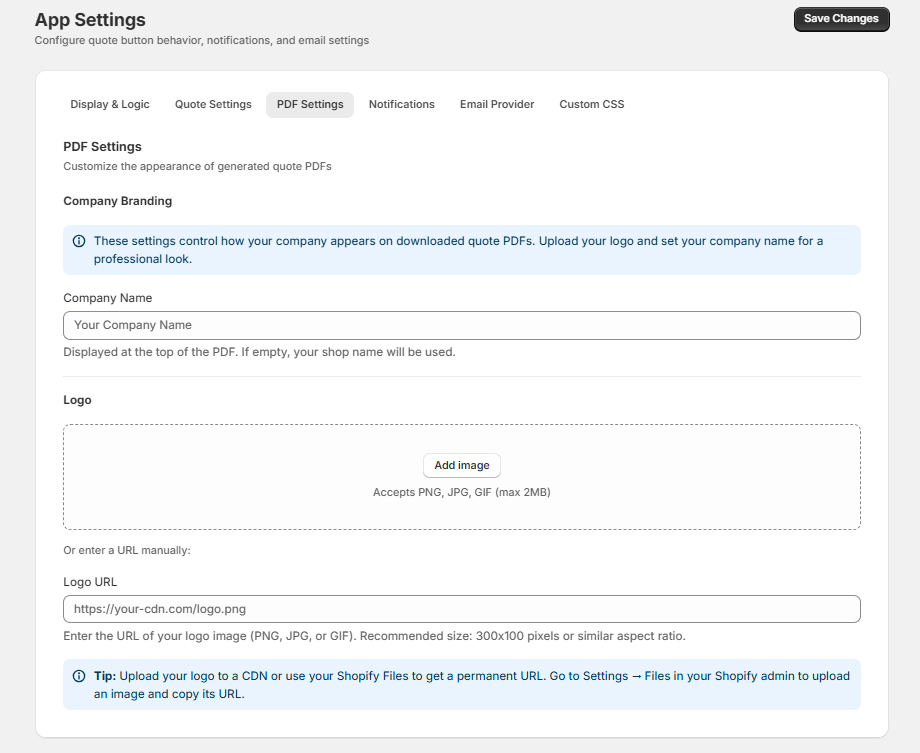
Your quote is a marketing document. A well-designed PDF proposal with your logo, itemized pricing, payment terms, and your custom notes signals professionalism and deliberate pricing. A plain-text email with a price list signals that your operation is informal and your prices are negotiable.
Must-have elements in a PDF quote:
- Company logo and branding
- Itemized line items with quantities, unit prices, and totals
- Custom pricing per customer
- Payment terms and conditions
- Validity period with expiration date
- Contact information and next steps
Feature 7: Conversation Timeline and Internal Notes
What it is: A centralized communication hub for each quote that keeps all context in one place.
When a buyer emails a question about their quote, calls to negotiate pricing, and then sends a revised purchase order — all that context needs to live alongside the quote itself. A conversation timeline captures every customer interaction, internal note, attachment, and status change so anyone on your team can pick up where the last person left off.
Must-have capabilities:
- Chronological activity log per quote
- Internal notes visible only to your team
- Attachment support for files, images, and documents
- Status change history with timestamps
Feature 8: Analytics and Reporting Dashboard
What it is: Data visualization showing quote performance metrics so you can measure and improve your process.
You cannot optimize what you do not measure. A reporting dashboard answers the questions that drive revenue growth: What is our conversion rate? Where do deals stall in the pipeline? Which products get quoted most often? How long does it take to close a deal?
Key metrics to track:
- Quote-to-order conversion rate (target: 35% or higher)
- Average quote value and trend over time
- Time to first response (target: under 1 hour)
- Time from quote to close
- Pipeline value by stage
- Quote volume trends by week, month, and quarter
Feature 9: Mobile-Friendly Interface
What it is: Fully functional quote management that works on smartphones and tablets without a degraded experience.
Your sales team is not always at a desk. They are at trade shows, on client visits, and working from their phones between meetings. If your quote management system requires a desktop browser to function, your team cannot respond to urgent requests when they are away from the office — and response speed is a competitive advantage in B2B sales.
A mobile-friendly interface means your team can view incoming quote requests, update pipeline stages, add notes, and even generate PDF proposals from any device.
Feature 10: Integration with Your Tech Stack
What it is: Seamless connections to the tools your team already uses every day.
A quote management system that operates in isolation creates data silos. The best systems integrate with your existing workflow — your ecommerce platform, your communication channels, and your order management process.
Essential integrations:
- Ecommerce platform — Shopify product catalog, customer data, and draft orders
- Email providers — AWS SES, Gmail, Outlook, SendGrid, Resend, or Mailgun for quote delivery
- Payment processing — Shopify checkout for draft order payments
The ROI of Modern Quote Management
Conservative estimate for a business generating 100 quotes per month:
- Time savings: 16.7 hours per month recovered from manual processes = $833 saved (at $50 per hour)
- Conversion improvement: 10 additional orders per month from better follow-up and faster response
- Revenue impact: At $2,500 average order value with 30% margin = $7,500 per month in additional profit
Total monthly value: $8,333
At $25 per month (Professional plan) for a system like AddToQuote, the return exceeds 33,000%. Even if your numbers are half this conservative estimate, the investment pays for itself many times over.
The key insight is that quote management ROI compounds. Faster responses win more deals. Better proposals increase deal size. Pipeline visibility prevents deals from falling through the cracks. Each feature reinforces the others. For strategies on maximizing that conversion improvement, see 7 proven strategies to convert quotes into sales.
Frequently Asked Questions
What features should a B2B quote management system include?
A modern B2B quote management system should include self-service quote request forms, customer-specific pricing, a CRM pipeline with stage tracking, one-click quote-to-order conversion, automated follow-up reminders, branded PDF quote generation, conversation timelines with internal notes, analytics dashboards, a mobile-friendly interface, and integrations with your existing tech stack.
Do I need a separate CRM if I have a quote management app?
Not necessarily. A quote management app with a built-in CRM pipeline — like AddToQuote — tracks every deal through stages from New to Won, includes conversation timelines, internal notes, and activity logs. This covers the core CRM functionality most B2B merchants need. You only need a separate CRM if you have complex sales processes that extend beyond quoting.
How does one-click quote-to-order conversion work on Shopify?
When a buyer approves a quote, you click the Create Invoice button in AddToQuote. The app automatically creates a Shopify draft order with every product, quantity, custom price, and customer detail transferred. The buyer receives a Shopify invoice they can pay through standard checkout. The entire process takes seconds instead of 15 minutes of manual re-entry.
Can I generate branded PDF quotes on Shopify?
Yes. AddToQuote generates branded PDF quotes with your logo, company details, line items, custom pricing, payment terms, and your custom notes. You send the PDF directly to the buyer via email from within the app. Professional proposals signal that your operation is established and your pricing is deliberate.
What is the ROI of a quote management system?
For a business generating 100 quotes per month, a conservative estimate shows $833 in time savings plus $7,500 in additional monthly profit from improved conversion — over $8,300 in monthly value against a starting investment of $25 per month.
Does AddToQuote work on Shopify Basic or do I need Shopify Plus?
AddToQuote works on any Shopify plan — Basic, Standard, Advanced, and Plus. You do not need Shopify Plus for quote management, CRM pipeline tracking, PDF proposals, price hiding, or draft order creation. Plans start at $25 per month (Professional), $50 per month (Advanced with Shopify Flow and webhooks), or $100 per month (Enterprise with per-product custom options). All include a 14-day free trial with no credit card required.
Get Started
Stop evaluating features in a spreadsheet — try them in your store. AddToQuote includes all 10 features covered in this guide: self-service forms, CRM pipeline, branded PDF proposals, one-click draft order creation, multi-channel notifications, analytics, and more. It works on any Shopify plan starting at $25 per month with a 14-day free trial. No credit card required.
Install AddToQuote on the Shopify App Store or book a free demo and we will show you every feature in action on your store.
Mohammad Mahdawi
Founder, AddToQuote
Founder of AddToQuote. 15+ years in B2B and B2C e-commerce, building tools that help merchants quote and close more deals.


