
Every quote sitting unanswered in your inbox is revenue walking out the door. B2B buyers send requests to multiple suppliers, compare responses, and move forward with the one that makes buying easiest. If your quote-to-order conversion rate is below 30%, the problem is not lead quality — it is what happens after the request comes in.
The gap between "I'm interested" and "Here's my purchase order" is where most deals are won or lost. Slow responses, inconsistent pricing, and lack of follow-up are the three biggest conversion killers, and they are all fixable. If you are still managing this process through email threads and spreadsheets, start with our B2B quote management guide to build the foundation first.
This guide covers seven strategies that top-performing wholesale merchants use to close more deals — each one actionable, each one backed by real-world results. Whether you handle 5 quotes a week or 50 a day, these principles apply.
Strategy 1: Respond in Under 60 Minutes
The single biggest predictor of whether you win a B2B deal is how fast you respond. When a buyer submits a quote request, they are actively evaluating suppliers. They have likely sent the same request to two or three competitors. The first supplier to respond with a professional proposal sets the benchmark — everyone else is playing catch-up.
According to Shopify's B2B documentation, B2B merchants need tools that support the longer sales cycles and negotiation workflows that business buyers expect. But "longer sales cycle" does not mean "slow to respond." The initial response needs to be fast even if the final negotiation takes weeks.
How to build a fast-response system:
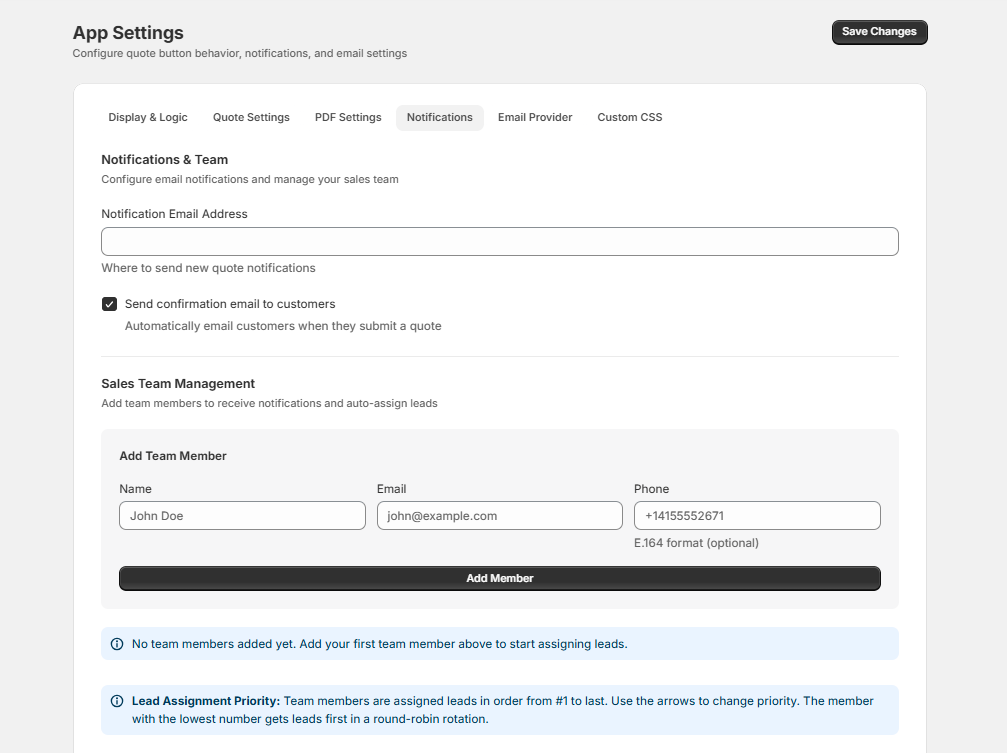
- Email notifications. Set up alerts through your connected email provider so someone on your team sees every request within minutes, not hours. Six providers are supported: AWS SES, Gmail, Outlook, SendGrid, Resend, and Mailgun.
- Quote duty rotation. Assign a team member to be "on point" for incoming quotes each day or shift. This eliminates the bystander effect where everyone assumes someone else will handle it.
- Response time SLAs. Set clear internal targets: 1 hour for standard requests, 4 hours for complex quotes requiring custom pricing. Track actual response times monthly and hold the team accountable.
- Auto-acknowledgment. Send an immediate confirmation when a request comes in so the buyer knows their quote is being worked on. This buys you time while keeping the buyer engaged.
In AddToQuote, multi-channel notifications are configured per store. Your sales team gets real-time alerts through whichever channels they actually check — no missed requests, no delays.
Strategy 2: Send Professional, Itemized Proposals
A quote is not just a price — it is a sales document. The way you present your pricing directly affects whether the buyer moves forward or keeps shopping. Generic one-line quotes with a total at the bottom lose to detailed, branded proposals every time.
What a professional B2B proposal includes:
- Itemized line items. Every product listed with SKU, description, quantity, unit price, and line total. No ambiguity about what the buyer is paying for.
- Volume discount breakdowns. Show the math: "100 units at $12.00 each = $1,200.00 — save 15% vs. standard pricing." Buyers need to justify the purchase internally, and clear savings make that easier.
- Payment terms. Net 30, Net 60, or whatever terms you offer. Putting this on the quote signals that you understand B2B purchasing.
- Validity period. Every quote should have an expiration date (more on this in Strategy 3).
- Your branding. Logo, company name, contact information. A branded PDF quote looks professional and reinforces trust.
For stores that serve different buyer tiers with different pricing, see our guide to customer-specific pricing on Shopify. And if you want to remove public pricing entirely to push buyers toward requesting quotes, learn how to hide prices on your Shopify store.
AddToQuote generates branded PDF proposals with your logo, line items, custom pricing, payment terms, and your custom notes — all from within the app. No manual formatting, no copy-pasting into Word documents.
Strategy 3: Create Urgency with Time-Limited Offers
Quotes without expiration dates do not create urgency — they create procrastination. When a buyer knows they can come back "anytime," they deprioritize the decision. A clear validity window forces the conversation forward without being aggressive.
Best practices for quote deadlines:
- 7 to 14 days is the sweet spot for most B2B quotes. Long enough for the buyer to route the proposal through internal approvals, short enough to maintain momentum.
- 30 days for large or complex orders that require committee sign-off or budget allocation.
- Pair deadlines with follow-up. Always send a reminder 2-3 days before expiration (see Strategy 6). A deadline without a nudge is just a date on a document.
- Make deadlines realistic. Artificial urgency — "This price expires in 24 hours!" — damages trust in B2B relationships. Your buyers are professionals who will see through manufactured scarcity.
What to avoid:
- Open-ended quotes that sit in your pipeline for months, distorting your conversion metrics
- Extremely short deadlines on first-time quotes where the buyer has no relationship with you yet
- Changing prices after expiration without notifying the buyer first
A good quote management system helps you track quote progress through pipeline stages so your sales workflow stays organized and accurate.
Strategy 4: Enable One-Click Quote-to-Order Conversion
Every extra step between "I approve this quote" and "The order is placed" costs you conversions. If a buyer has to re-enter product details, look up their shipping address, or navigate a complicated checkout flow, some percentage will drop off — especially for repeat orders.
The goal is to make saying "yes" as frictionless as possible. On Shopify, the most effective path is converting an approved quote directly into a Shopify draft order that the buyer can pay through standard checkout.
What frictionless conversion looks like:
- One-click draft order creation. Every product, quantity, price, and customer detail transfers from the quote to the order automatically. No manual re-entry.
- Pre-filled checkout. The buyer receives a Shopify invoice with everything already populated. They review, confirm, and pay.
- Consistent pricing. The draft order matches the quoted price exactly. No surprises at checkout that make the buyer question the deal.
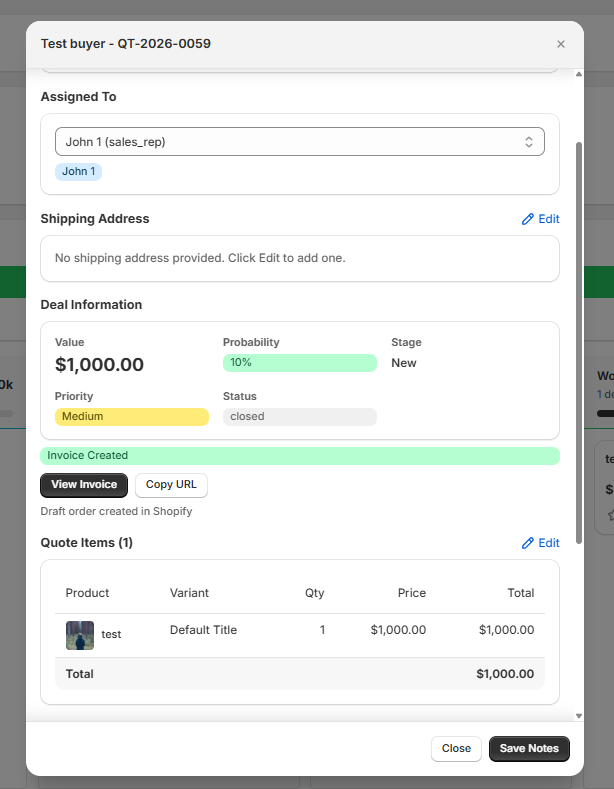
In AddToQuote, click the Create Invoice button on any approved quote. The app creates a Shopify draft order with all line items, pricing, and customer information carried over. The buyer receives an invoice they pay through Shopify's standard checkout. For a detailed walkthrough, see how to convert quotes to Shopify draft orders.
Strategy 5: Use Data to Personalize Recommendations
Your CRM pipeline contains a goldmine of information about what your buyers purchase, how often they reorder, and what products they tend to buy together. Using this data to personalize quotes increases average order value and makes the buyer feel understood.
How to use quote data effectively:
- Cross-sell based on history. If a buyer regularly orders Product A, and 70% of Product A buyers also purchase Product B, include Product B as a recommended add-on in the next quote.
- Reorder prompts. Track order frequency and proactively reach out when a buyer is likely due for a replenishment order. A well-timed quote based on their purchasing cycle converts at a much higher rate than a cold outreach.
- Tiered pricing incentives. If a buyer is close to the next volume discount threshold, show them: "Add 20 more units to unlock 15% off your entire order." This increases order size while giving the buyer a genuine reason to buy more.
- Bundle recommendations. Group complementary products into packages with a small discount. Bundles simplify the buying decision and increase revenue per quote.
The key is relevance. Generic cross-sell suggestions ("You might also like...") are easy to ignore. Recommendations based on actual purchase history and pipeline data feel helpful, not salesy.
Strategy 6: Build a Systematic Follow-Up Sequence
Most quotes are not rejected — they are forgotten. The buyer had every intention of moving forward, but a meeting came up, a competing priority landed on their desk, and your quote slipped to page two of their inbox. Without follow-up, that revenue is gone.
Research shows that 60% of buyers say no four times before saying yes. Yet most sales teams give up after one or two attempts. A systematic follow-up sequence recovers deals that would otherwise disappear.
The 3-7-14 follow-up cadence:
Day 3 — Check-in. A simple, low-pressure message: "Hi [Name], I wanted to see if you had any questions about the quote I sent on Monday. Happy to adjust anything." This reopens the conversation without pushing for a decision.
Day 7 — Value reminder. Reference the quote number and remind them of the validity period: "Just following up on quote #1234. As a reminder, this pricing is valid through [date]. Let me know if you would like to proceed or if anything needs adjusting." This creates gentle urgency.
Day 14 — Final follow-up. A direct but respectful close: "Your quote expires in 3 days. Would you like to move forward, or should I revise anything before the deadline?" Give them a clear yes-or-no moment.
Tracking follow-ups in a CRM pipeline:
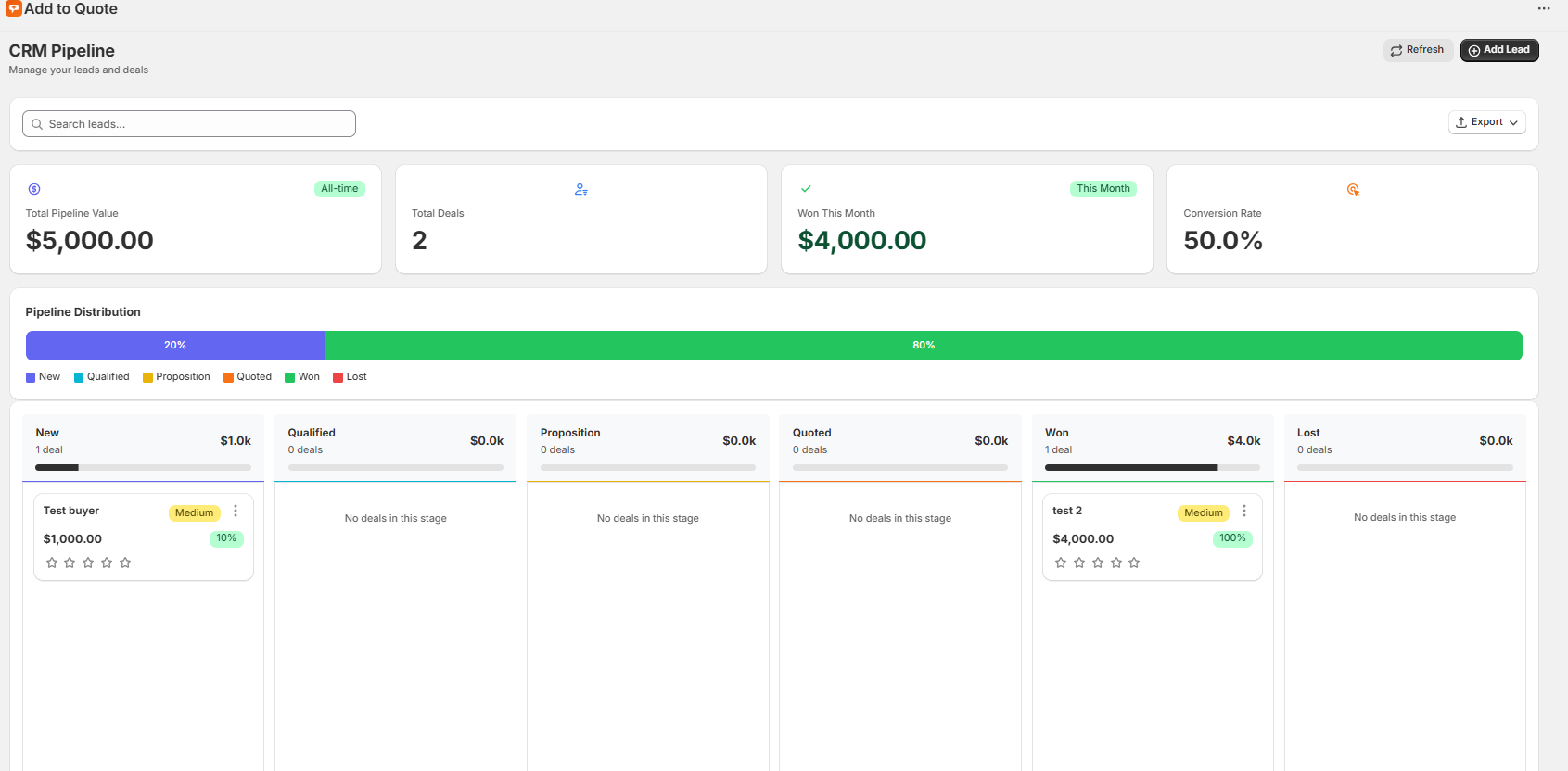
A CRM pipeline with stages — New, Qualified, Proposition, Quoted, Won, Lost — gives your team visibility into exactly where each deal stands. When a quote moves from "New" to "Qualified," you know the buyer has engaged. When it stalls at "Quoted" for a week, the system flags it for follow-up.
Without pipeline tracking, follow-up is ad hoc and inconsistent. With it, every quote gets the attention it deserves.
Strategy 7: Show Social Proof and Trust Signals
B2B purchases carry more risk than consumer purchases. A bad buying decision in B2C means returning a $50 product. A bad decision in B2B can mean $50,000 in wasted inventory, a broken supply chain, or a career setback for the person who signed off on the deal. Buyers are risk-averse because the stakes are real.
Trust elements that reduce perceived risk:
- Customer references. "We supply 200+ businesses in [industry]" is more credible than a vague claim about quality. Specific numbers and specific industries build trust.
- Industry certifications. ISO, quality standards, or industry-specific certifications signal that your operation meets established benchmarks.
- Guarantees. A satisfaction guarantee, price-match promise, or flexible return policy removes the "what if it doesn't work out?" objection.
- Consistent branding. Professional, branded quotes (see Strategy 2) signal that you are an established operation, not a fly-by-night supplier.
- Response quality. How you handle the quoting process itself is social proof. Fast responses, clear communication, and well-formatted proposals tell the buyer what it will be like to work with you after they place the order.
Trust is cumulative. No single element closes the deal on its own, but together they remove the friction that causes buyers to hesitate.
The Compound Effect
No single strategy transforms your conversion rate overnight. But these seven strategies compound on each other. Faster response times mean you reach the buyer while they are still in decision mode. Professional proposals make it easy for them to justify the purchase internally. Urgency prevents the deal from drifting. One-click conversion removes the last barrier to saying yes. Follow-up catches the deals that would otherwise slip through the cracks.
Here is a realistic scenario. A merchant with a 20% quote-to-order conversion rate implements three changes: response time drops from 24 hours to under 2 hours, quotes include branded PDF proposals with itemized pricing, and a 3-7-14 follow-up cadence is put in place. Each change improves conversion by 5-10 percentage points independently. Combined, that merchant is now closing 35-40% of quotes — nearly double the starting rate — without spending more on marketing or generating more leads.
The sale does not end when you send the quote. That is when it begins.
How to Get Started
If you recognize these problems in your own quoting process, here is how to fix them:
- Install AddToQuote. The app works on any Shopify plan — Basic, Standard, Advanced, or Plus. A quote button appears on every product page automatically in store-wide mode, replacing Add to Cart so your entire storefront is geared toward quoting.
- Configure notifications. Connect your email provider (AWS SES, Gmail, Outlook, SendGrid, Resend, or Mailgun) so your team sees every quote request within minutes.
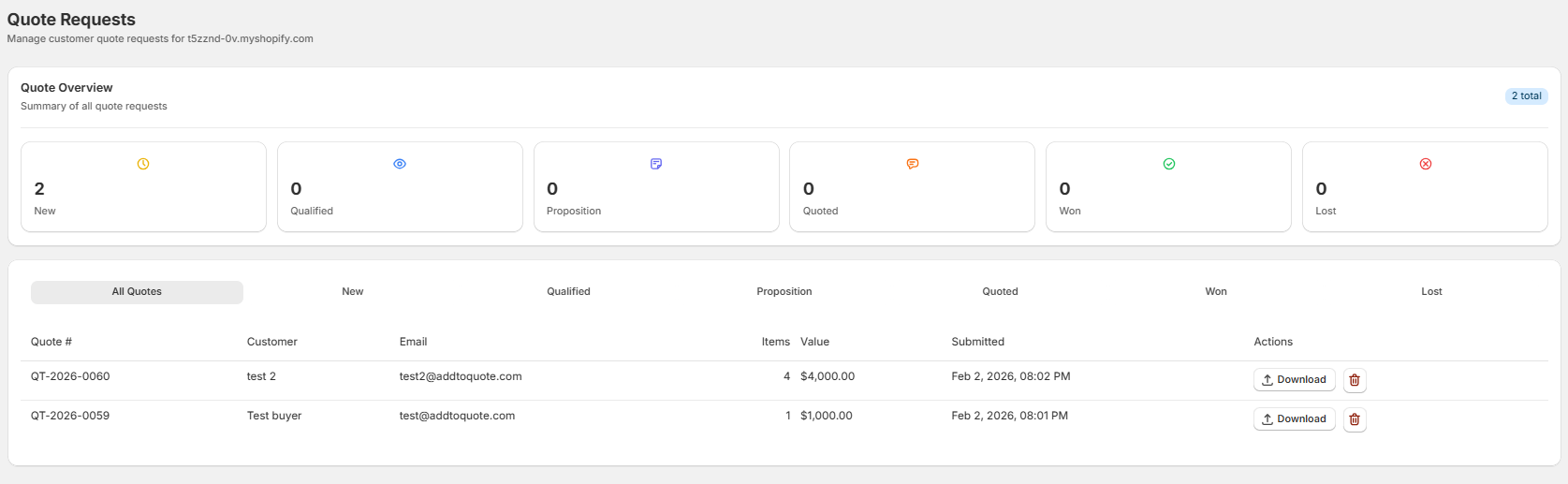
- Set up your CRM pipeline. Organize quotes into stages — New, Qualified, Proposition, Quoted, Won, Lost — and track every deal from request to close.
- Start converting. Generate branded PDF proposals, send them to buyers, and convert approved quotes to Shopify draft orders with one click.
Not sure if your store needs quoting? Check 5 signs your store needs a quote app to see if the fit is right.
AddToQuote is available on the Shopify App Store with a 14-day free trial. No credit card required.
Frequently Asked Questions
What is a good B2B quote-to-order conversion rate?
B2B quote-to-order conversion rates typically range from 15% to 30%. Top-performing teams with fast response times, professional PDF proposals, and structured follow-up sequences achieve 35% to 45%. Track this metric monthly in a CRM pipeline to identify where deals stall.
How fast should I respond to a quote request?
Within 1 hour for standard requests and within 4 hours for complex quotes requiring custom pricing. The first supplier to respond with a professional proposal is significantly more likely to win the deal. Multi-channel notifications ensure your team sees every request immediately.
How many times should I follow up on an unanswered quote?
At least three times: once at 3 days, again at 7 days, and a final follow-up at 14 days. Research shows that 60% of buyers say no four times before saying yes. Most quotes are not rejected — they are forgotten. Systematic follow-up recovers revenue that would otherwise disappear.
Should I add an expiration date to my quotes?
Yes. A 7-to-14-day validity window creates urgency without pressuring the buyer. It also keeps your pipeline organized by encouraging timely responses. Always pair the deadline with a follow-up email so the buyer has a chance to act.
Does AddToQuote help with quote conversion?
Yes. AddToQuote provides a CRM pipeline that tracks every quote from request to close, multi-channel notifications for fast response times, branded PDF proposals, and one-click draft order creation. These tools address the biggest conversion killers: slow responses, inconsistent quoting, and lack of follow-up.
Can I convert an approved quote to a Shopify order with one click?
Yes. In AddToQuote, click the Create Invoice button on any approved quote. The app creates a Shopify draft order with every product, quantity, price, and customer detail transferred automatically. The buyer receives a Shopify invoice they can pay through standard checkout.
Bottom Line
Quote conversion is not about working harder — it is about fixing the process. Respond faster, present professional proposals, create urgency, remove friction, personalize recommendations, follow up systematically, and build trust at every touchpoint. These seven strategies address the root causes of lost deals and compound on each other over time.
AddToQuote gives Shopify merchants the full toolkit: multi-channel notifications for fast response times, branded PDF quotes, a CRM pipeline with stage tracking, and one-click draft order creation. It works on any Shopify plan with a 14-day free trial, starting at $25 per month.
Book a free demo and we will walk you through the full workflow for your store.
Mohammad Mahdawi
Founder, AddToQuote
Founder of AddToQuote. 15+ years in B2B and B2C e-commerce, building tools that help merchants quote and close more deals.


