
Hiding prices on your Shopify store is one of the most common requests from B2B merchants. According to Gartner, 83% of B2B buyers prefer ordering or paying through digital commerce — but that doesn't mean they want to see prices upfront. For wholesalers, manufacturers, and custom-order businesses, visible pricing can actually hurt conversions.
Whether you're enforcing MAP pricing, protecting wholesale rates from public view, or using "call for price" to generate leads, there are several ways to hide prices on Shopify. But not all methods are equal. Some risk breaking your theme, others cost thousands per month, and some work out of the box on any plan.
In this guide, we'll compare three popular approaches side by side so you can pick the right one for your business.
Why Merchants Hide Prices
Before diving into the how, let's understand the why. B2B and wholesale merchants hide prices for several important reasons:
- MAP compliance: Minimum Advertised Price agreements with manufacturers prevent you from showing prices below a set threshold. Violating MAP can get you cut off from suppliers.
- Wholesale exclusivity: Only approved buyers should see your wholesale rates. Public pricing lets competitors and retail customers see your margins.
- Custom pricing: Many B2B relationships involve negotiated rates based on volume, contract terms, or customer history. A single public price doesn't work.
- Lead generation: Replacing prices with "Request a Quote" encourages direct contact. You capture the lead, start a conversation, and build a relationship before discussing numbers.
- Competitive protection: Visible pricing makes it trivial for competitors to undercut you or scrape your catalog. Hidden prices add a layer of protection.
The method you choose matters. A bad implementation can break your storefront, confuse customers, or cost more than it's worth. Here's how the three main options compare.
Method 1: Edit Your Theme Code (Liquid)
How it works: You modify your theme's Liquid templates to conditionally hide or remove price elements using CSS or Liquid logic. Shopify themes use Shopify theme app extensions to structure how apps interact with storefronts — but with direct code edits, you bypass that system entirely.
A typical approach involves adding CSS like "display: none" to price elements, or wrapping price blocks in Liquid conditionals. Some developers also use JavaScript to remove price elements after the page loads.
Pros:
- Free — no app subscription needed
- Full control over exactly what's hidden and where
- Can target very specific elements
Cons:
- High risk: One wrong edit can break your entire product page or even your whole theme
- Resets on theme updates: Every time you update your theme, your customizations are lost
- Requires knowledge of Liquid, CSS, and sometimes JavaScript
- No on/off toggle — you have to edit code every time you want to change it
- Testing is manual — you have to check every product page yourself
- No replacement CTA — you have to build a "Request a Quote" button from scratch
Verdict: Only recommended if you have a developer on staff who can maintain the code through theme updates. For most merchants, the risk and ongoing maintenance cost outweigh the savings.
Method 2: Shopify B2B Native (Shopify Plus)
How it works: Shopify Plus includes native B2B features that let you create company profiles, assign custom catalogs, and set customer-specific pricing. You can control who sees what prices based on their company login. See the Shopify B2B documentation for the full feature list.
Pros:
- Native Shopify integration — no third-party apps needed
- Supports customer-specific and company-specific pricing
- Professional B2B checkout experience with net payment terms
- Works with Shopify's built-in authentication
Cons:
- Requires Shopify Plus at $2,300+/month — a significant cost for small to mid-size wholesalers
- Limited to company-based access control (not flexible per-product visibility)
- No quote management or CRM built in — you still need a separate system to manage quote requests
- Setup is complex and requires understanding of Shopify's company/catalog model
- Overkill if your primary goal is simply hiding prices and collecting quote requests
Verdict: Great if you're already on Shopify Plus and need full B2B catalog management with tiered pricing. But if you just want to hide prices and let customers request quotes, you're paying $2,300+/month for a feature that costs a fraction of that with an app. For a deeper comparison, see our Shopify B2B vs Plus comparison.
Method 3: AddToQuote App
How it works: Install AddToQuote from the Shopify App Store, enable the app embed in your Theme Editor, and toggle price hiding on. The app uses Shopify's theme app extensions to detect and hide price elements automatically — no code editing, no theme modifications, and fully reversible.
Pros:
- Works with any Shopify plan — Basic, Shopify, Advanced, or Plus
- Non-destructive — uses theme app extensions, never touches your theme code
- Scoped to the product section only (collection pages, search results, and cart are not affected)
- 20+ built-in theme selectors that automatically detect price elements across popular themes
- Custom CSS selectors for themes with non-standard markup
- One-click toggle from the Theme Editor — turn price hiding on or off instantly
- Replaces "Add to Cart" with a customizable "Request a Quote" button
- Built-in CRM pipeline to manage every quote from request to close
- Custom quote forms so you collect exactly the information you need
Cons:
- Monthly subscription ($25-50/month, with 14-day free trial)
- Requires a Shopify 2.0 theme (most themes since 2021)
Verdict: The best option for most merchants. No code changes, no Plus requirement, and you get a complete quote management system included. If you're new to quote workflows, our B2B quote management guide explains how the full process works.
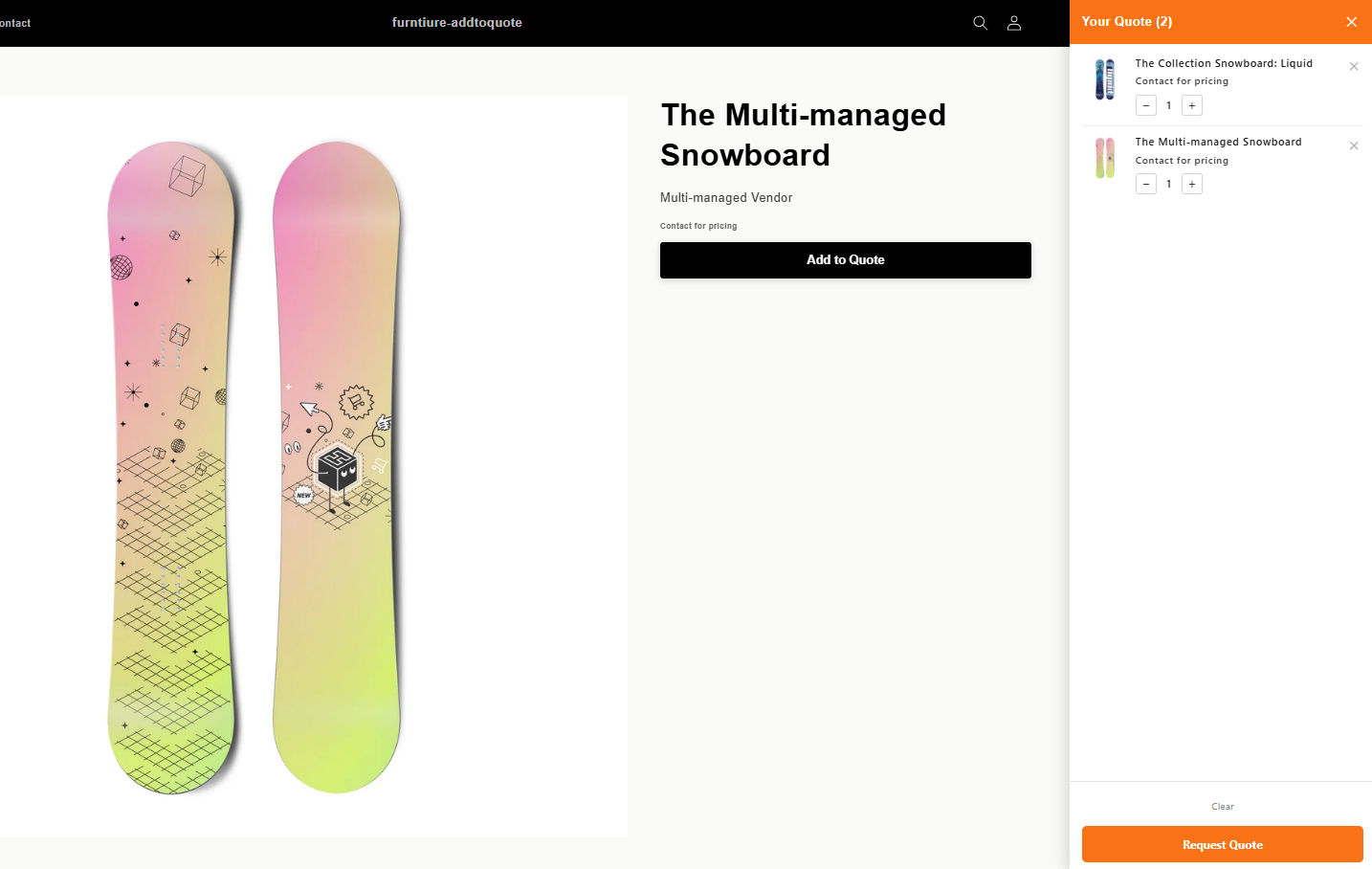
Here's what it looks like on the storefront — prices are replaced with "Contact for pricing" and customers use the quote cart to submit requests:
Head-to-Head Comparison
| Feature | Theme Code | Shopify Plus B2B | AddToQuote |
|---|---|---|---|
| Setup Difficulty | Hard | Medium | Easy |
| Risk to Theme | High | Low | None |
| Survives Theme Updates | No | Yes | Yes |
| Quote Management | No | No | Yes |
| CRM Pipeline | No | No | Yes |
| Custom Quote Forms | No | No | Yes |
| Works on Any Plan | Yes | No (Plus only) | Yes |
| On/Off Toggle | No | Yes | Yes |
| Auto Price Detection | No | N/A | Yes (20+ selectors) |
How to Set Up Price Hiding with AddToQuote
Getting started takes about 5 minutes. Here's the step-by-step process:
Step 1: Install the App
Visit AddToQuote on the Shopify App Store and click "Add app." The 14-day free trial gives you full access to every feature — no credit card required to start.
Step 2: Add the Button Block in Theme Editor
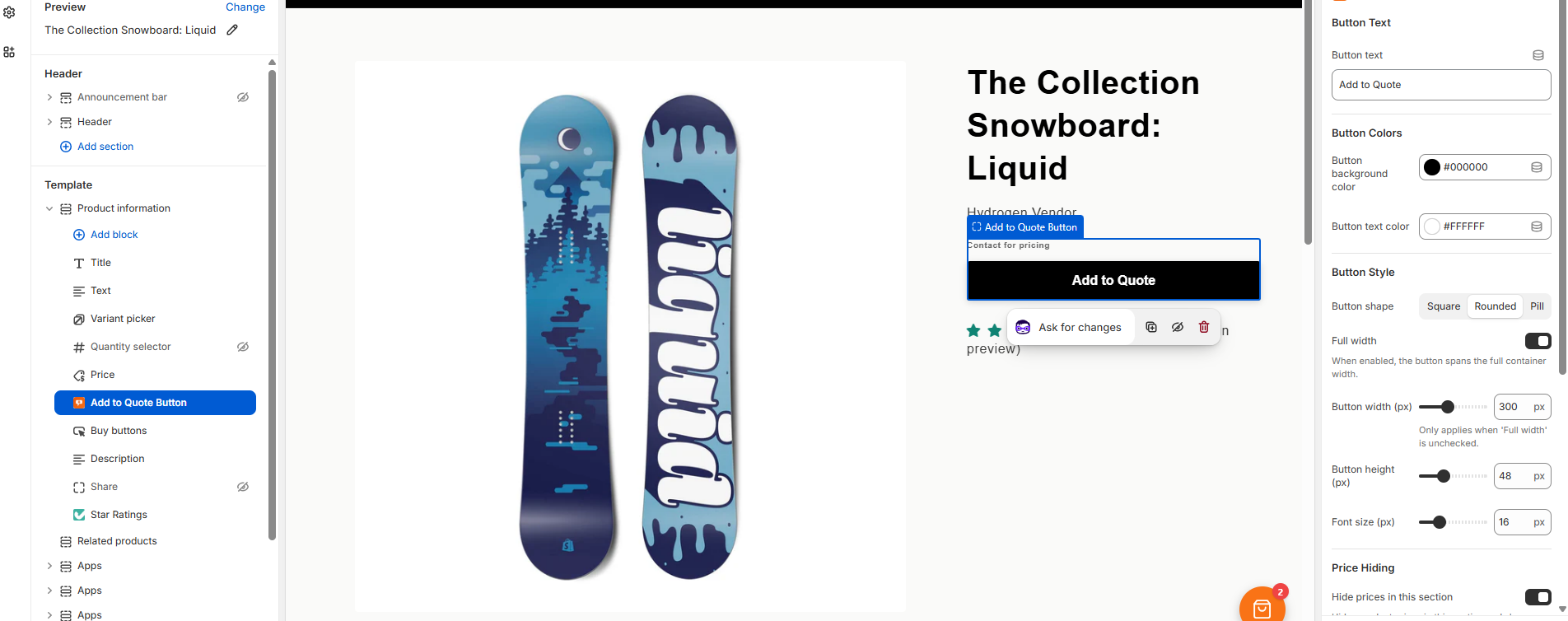
Open your Shopify admin, go to Online Store > Themes > Customize, and navigate to any product page. In the left sidebar under your product template, click Add block and select Add to Quote Button. This is where you configure the button text, colors, style, and price hiding options.
Step 3: Enable Price Hiding in Settings
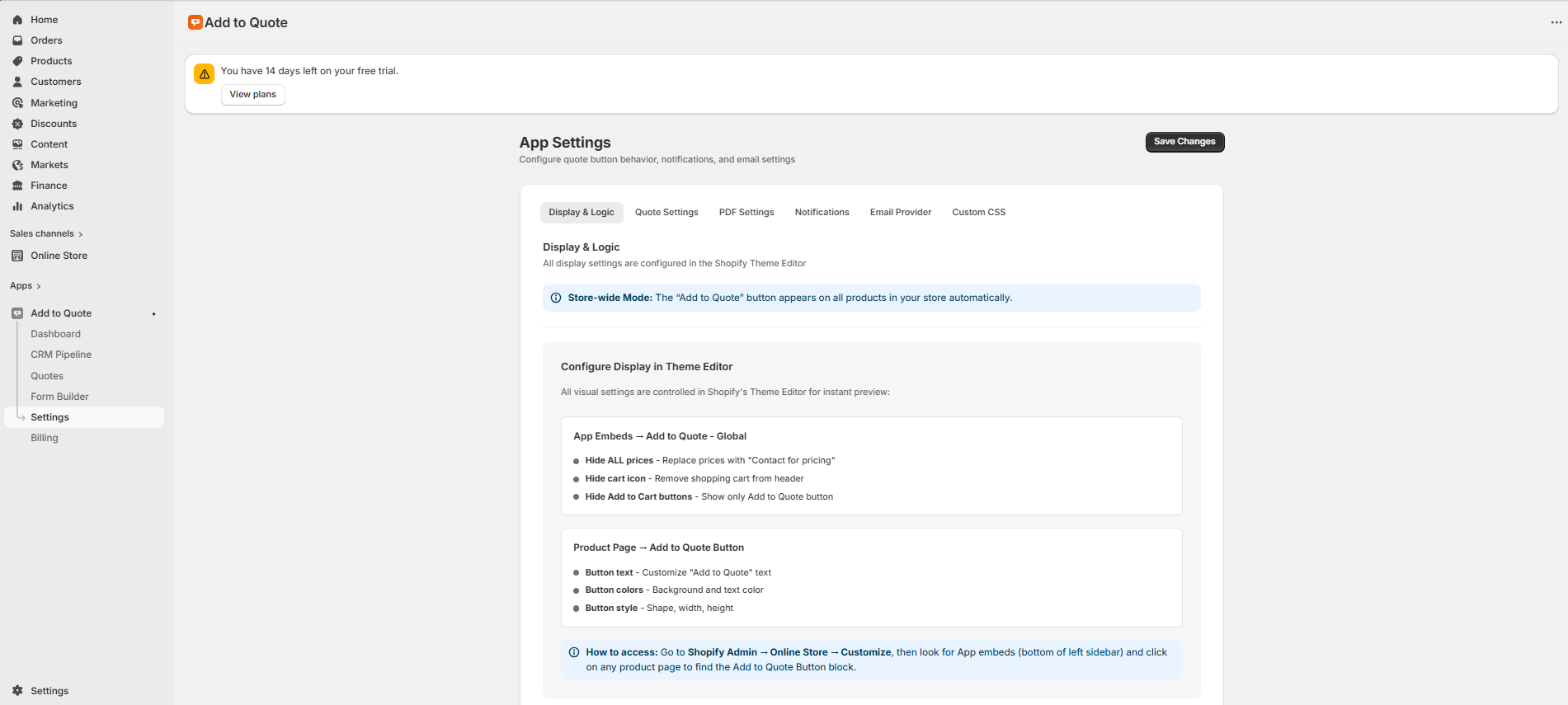
In the AddToQuote app dashboard, go to Settings > Display & Logic. This page shows you exactly how everything is configured and where to find each setting in the Theme Editor. The app uses store-wide mode — the quote button automatically appears on all product pages.
Step 4: Customize Your Quote Form
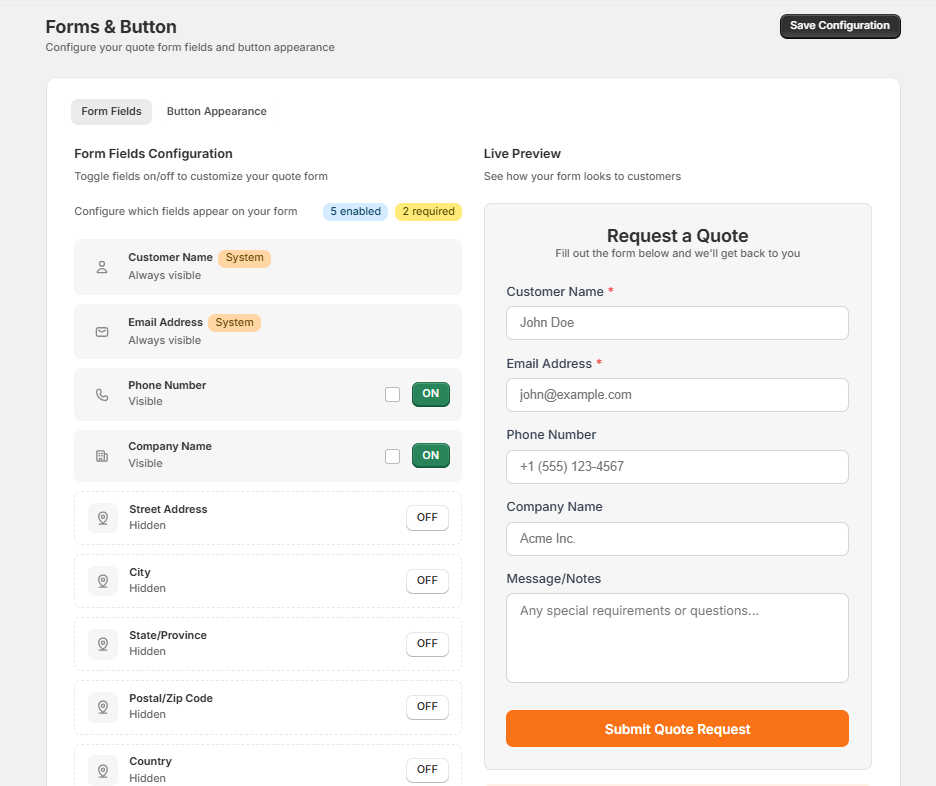
By default, the quote form collects customer name, email, phone, and company name. You can customize which fields are visible, which are required, and add a message field for special requirements. The form builder shows a live preview so you see exactly what your customers will see.
That's it. Your prices are hidden, and customers see a customizable "Request a Quote" button instead of "Add to Cart." Every submission lands in your CRM pipeline ready for follow-up.
What Happens After Hiding Prices?
Hiding prices is just the first step. The real value comes from what happens next — turning anonymous browsers into qualified leads.
When a customer clicks "Request a Quote," they add products to a quote cart (similar to a shopping cart), then fill out a form with their contact details and requirements. The quote request appears in your AddToQuote CRM pipeline, where your team can:
- Review the request — see every product, quantity, and customer note in one place
- Qualify the lead — move quotes through stages: New, Qualified, Proposition, Quoted, Won, or Lost
- Set custom pricing — adjust prices per line item based on volume, relationship, or negotiation
- Generate a PDF quote — create a professional, branded quote document with one click
- Send it to the customer — email the quote directly from the app
- Convert quotes to draft orders — when the customer accepts, turn it into a Shopify order seamlessly
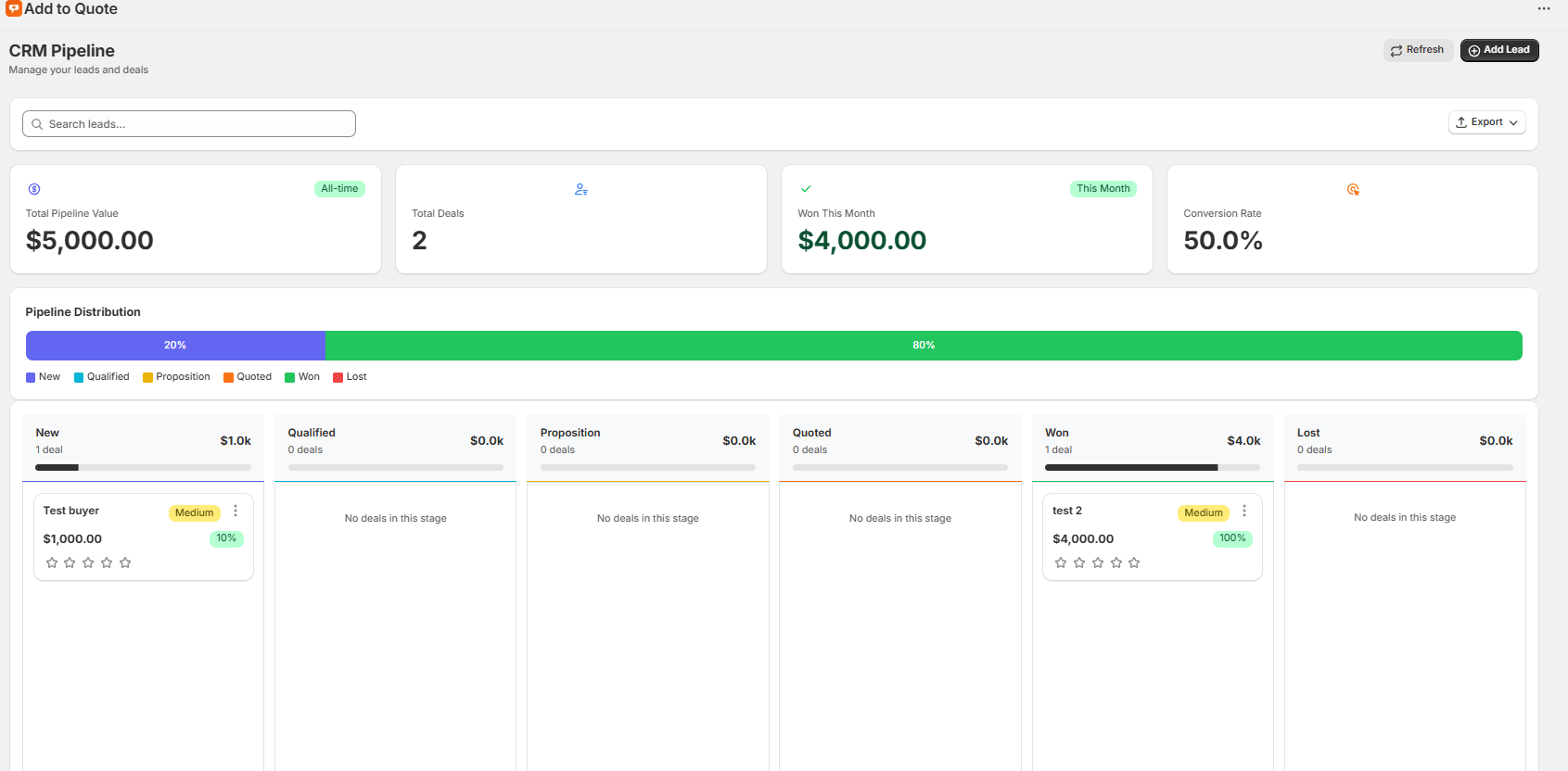
This turns price hiding from a simple display change into a complete lead generation and sales pipeline. Every hidden price becomes a conversation starter, and every conversation is tracked from first contact to close.
Frequently Asked Questions
Can I hide prices on specific products only?
AddToQuote operates in store-wide mode — the quote button and price hiding apply to all product pages automatically. This keeps the customer experience consistent across your entire catalog. The price hiding is scoped to the product section only, so collection pages, search results, and the cart display are not affected.
Will hiding prices affect my SEO?
No. Price hiding happens client-side through Shopify's theme app extensions. Search engine crawlers see your original page structure including prices. Your Product structured data (schema markup) remains intact, so search rankings, rich snippets, and Google Shopping eligibility are unaffected.
Can customers still see prices in Google Shopping?
Yes. Google Shopping pulls pricing data from your Shopify product feed, not from what's displayed on the storefront. Price hiding only changes what human visitors see when they browse your website. Your product feed, Google Merchant Center, and any price comparison sites will continue to show your listed prices.
Does this work with all Shopify themes?
AddToQuote works with any Shopify 2.0 theme (which includes every theme published since 2021). The app uses 20+ built-in CSS selectors to automatically detect price elements across popular themes like Dawn, Debut, Sense, and Craft. For themes with non-standard markup, you can add your own custom CSS selectors in the app settings — no coding knowledge required.
Can I show a custom message instead of the price?
Yes. In the Theme Editor settings for the Add to Quote Button block, you can set replacement text that appears where the price used to be. Common examples include "Request a Quote," "Contact for Pricing," "Call for Price," or "Login to See Pricing." You can change this text at any time without editing code.
What notifications do I get when a quote comes in?
AddToQuote supports email notifications through 6 providers: AWS SES (default), Gmail, Outlook, SendGrid, Resend, and Mailgun. Connect your preferred provider and your team receives automatic alerts for new quote requests, status changes, and assignments.
Is there a free trial?
Yes. AddToQuote includes a 14-day free trial with full access to all features. You can set up price hiding, test the quote flow, and see the CRM pipeline in action before committing. No credit card is required to start the trial.
Bottom Line
If you need to hide prices on your Shopify store, you have three realistic options: edit your theme code (free but risky), upgrade to Shopify Plus (powerful but expensive), or install a purpose-built app like AddToQuote (affordable and feature-rich).
For most B2B merchants, AddToQuote offers the best balance of cost, safety, and functionality. You don't need Shopify Plus, you don't need a developer, and you get a full quote management system with CRM, PDF generation, and multi-channel notifications — all included.
Not sure if a quote app is the right fit? Check out 5 signs your Shopify store needs a quote app, or book a free demo to see it in action.
For a detailed walkthrough of every price hiding option, visit our complete guide to hiding prices on Shopify.
Mohammad Mahdawi
Founder, AddToQuote
Founder of AddToQuote. 15+ years in B2B and B2C e-commerce, building tools that help merchants quote and close more deals.


