
The B2B ecommerce market is projected to reach $36 trillion by 2026, yet most wholesale merchants on Shopify still manage quotes through email threads and spreadsheets. Every quote that sits unanswered in an inbox is revenue walking out the door — research shows that the first supplier to respond is 50% more likely to win the deal.
Manual quoting creates three problems that compound over time: slow response times cost you deals, inconsistent pricing erodes buyer trust, and zero pipeline visibility means you cannot improve what you cannot measure.
This guide walks you through building a B2B quote management workflow on Shopify — from capturing requests and tracking deals in a CRM pipeline to generating branded PDF proposals and converting approved quotes into orders. Whether you handle 5 quotes a week or 50 a day, the same principles apply. If you are not sure whether your store needs quoting at all, start with 5 signs your store needs a quote app.
Why Quote Management Matters for B2B Success
B2B buying is fundamentally different from B2C. A consumer adds a product to the cart and pays immediately. A business buyer requests a quote, negotiates pricing, routes the proposal through internal approvals, and only then places an order — often weeks after the initial inquiry. That gap between "I'm interested" and "Here's my purchase order" is where deals are won or lost.
Structured quote management matters for three reasons:
1. Response time is a competitive advantage. When a buyer requests quotes from three suppliers, the one who responds first with a professional proposal sets the benchmark. The others are playing catch-up. Setting internal SLAs — 1 hour for standard requests, 4 hours for complex quotes — ensures your team never falls behind.
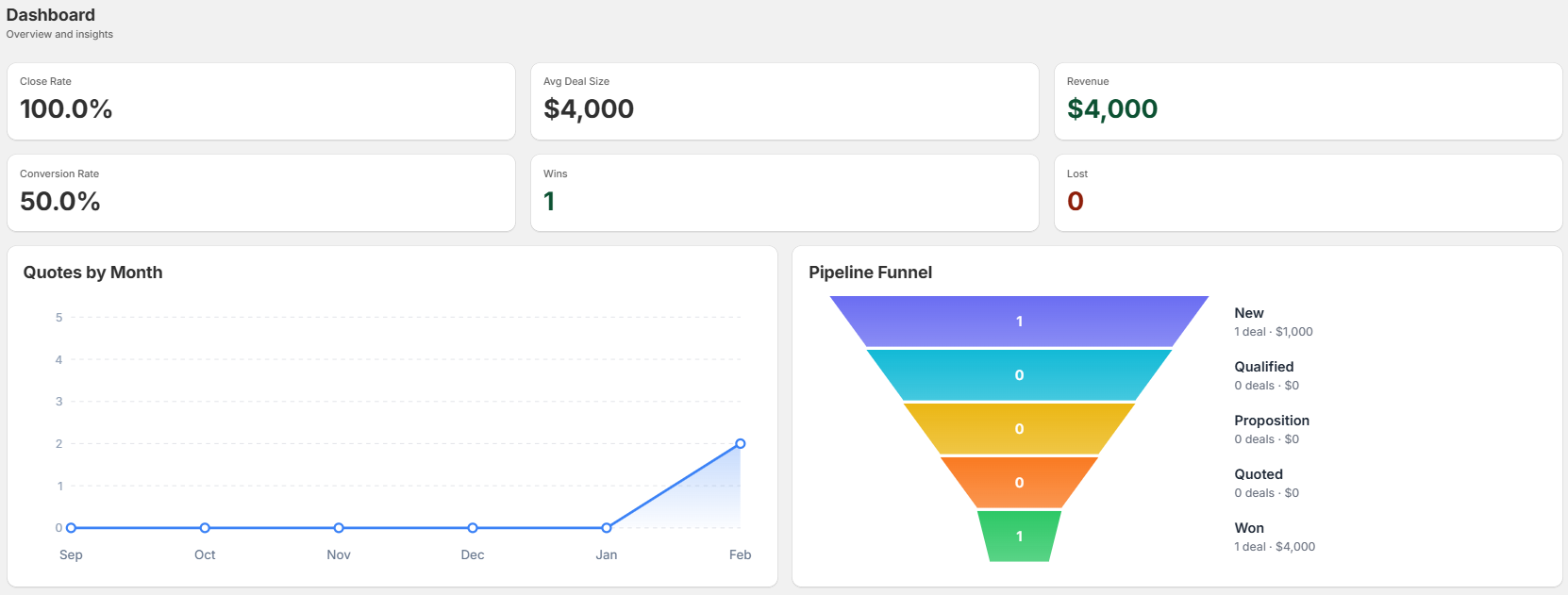
2. Pipeline visibility replaces guesswork. Without a CRM pipeline, you cannot tell how many quotes are pending, which deals are stalled, or what your conversion rate looks like. A structured system tracks every quote from initial request through to closed deal, giving you data to optimize your process. According to Shopify's B2B documentation, B2B merchants need tools that support the longer sales cycles and negotiation workflows that business buyers expect.
3. Consistency builds buyer trust. When every quote uses the same branded PDF template, the same pricing logic, and the same follow-up cadence, buyers perceive your operation as professional and reliable. Inconsistency — different reps quoting different prices, quotes arriving in different formats — signals disorganization.
Essential Features of Modern Quote Management
1. Self-Service Quote Requests
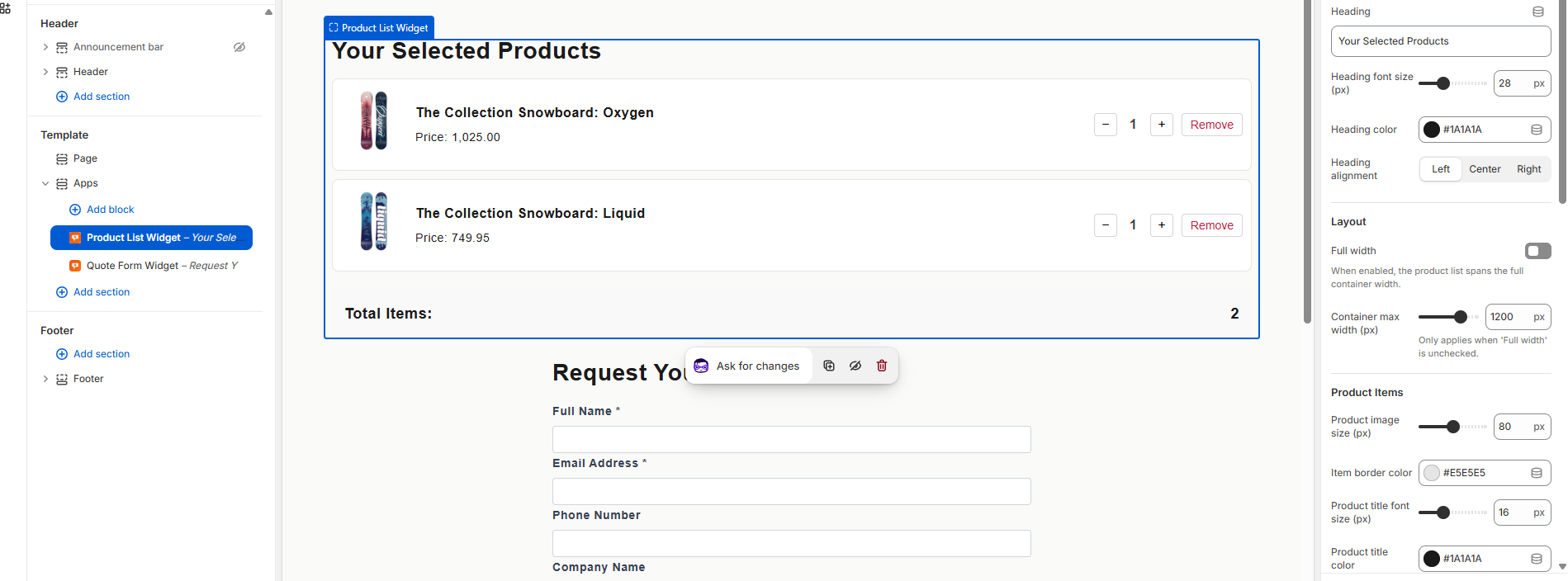
The best B2B quote workflows start on the storefront, not in an email thread. A quote request button on your product pages lets buyers browse your catalog, select the products they need, specify quantities and variants, and submit a structured request — all without leaving your store.
With AddToQuote, the quote button appears on every product page automatically in store-wide mode. It replaces the standard Add to Cart button so the entire storefront is geared toward quoting. Buyers add products to a quote cart, review their selections, and submit through a customizable form that captures exactly the information you need: company name, shipping address, payment terms, and any special requirements.
The form builder matters more than most merchants realize. Every unnecessary field reduces completion rates. Start with the essentials — name, email, company, and a message field — and add more only when you have data showing what your sales team actually needs. For stores that serve different buyer tiers with different pricing, see our guide to customer-specific pricing setup.
2. Automated Notifications and Tracking
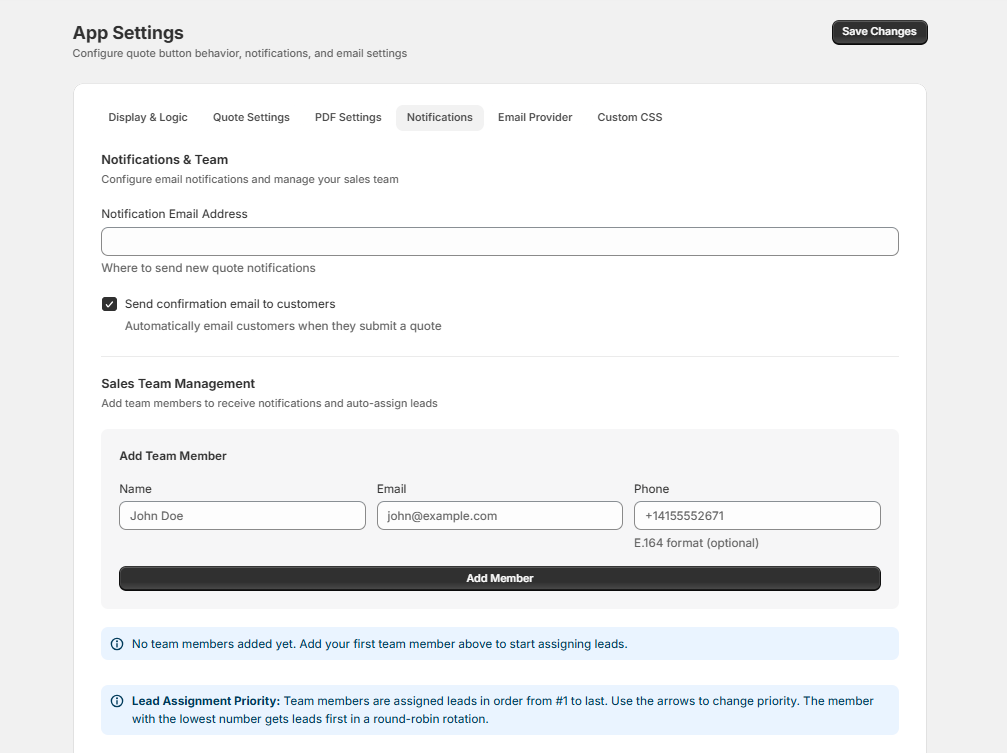
A quote request that sits unseen for hours is a quote request that may never convert. Multi-channel notifications solve this by alerting your team the instant a new request arrives — not just by email, but through whatever channel your team already monitors.
AddToQuote sends email notifications through 6 providers: AWS SES (default), Gmail, Outlook, SendGrid, Resend, and Mailgun. You configure which provider to use and your team receives alerts for new quote requests, status changes, and assignments automatically.
Every quote moves through a CRM pipeline with defined stages: New, Qualified, Proposition, Quoted, Won, and Lost. Each stage change is logged with a timestamp, so you can measure exactly how long quotes spend at each phase. When a quote stalls in "Quoted" for a week, you know it is time to follow up — and you have the customer's full history to inform your outreach.
3. Quick Quote Generation
Speed matters at every stage, but especially when generating the quote itself. Your sales team should be able to review a request, adjust pricing if needed, and send a professional PDF proposal within minutes — not hours.
AddToQuote lets you generate branded PDF quotes with your logo, line items, quantities, unit prices, totals, payment terms, and your custom notes. You customize the template once and every quote uses it. The PDF is sent directly to the buyer's email from within the app.
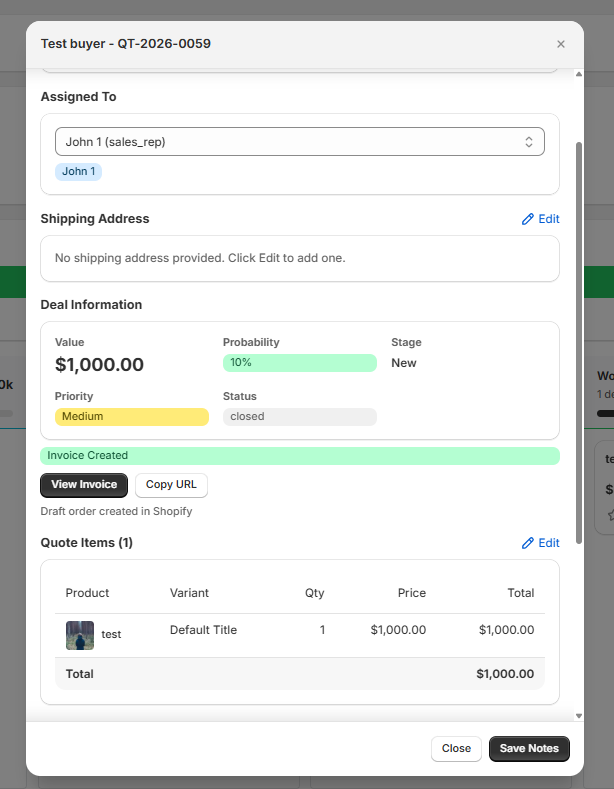
When the buyer approves, you click Create Invoice and AddToQuote generates a Shopify draft order with every product, quantity, price, and customer detail transferred automatically. No manual re-entry. No copy-paste errors. The buyer receives an invoice they can pay through Shopify's standard checkout. For a detailed walkthrough of this process, see convert quotes to draft orders.
Building Your Quote Management Workflow
Step 1: Capture Quote Requests
Start by installing a quote management app and configuring your storefront. With AddToQuote, the setup takes four steps in the Shopify Theme Editor: enable the app embed, add the popup widget, and the quote button appears on all product pages automatically.
Design your quote request form to balance information capture with completion rates. The default form includes name, email, company, phone, and a message field. You can add custom fields — project deadlines, purchase order numbers, shipping preferences — through the form builder. Every field you add should serve a clear purpose in your quoting process.
For stores where pricing depends on buyer relationships, you may also want to hide prices on Shopify and replace them with a "Request a Quote" prompt. AddToQuote handles price hiding at the product section level — collection pages, search results, and the cart display remain unaffected.
Step 2: Set Response Time Standards
Your response time SLA is the single most impactful policy you can set. Research consistently shows that faster responses correlate with higher conversion rates — not just because buyers are impatient, but because the first detailed proposal frames the entire negotiation.
Set three tiers based on quote complexity:
- Standard requests (catalog products, known pricing): respond within 1 hour
- Custom pricing requests (volume discounts, negotiated terms): respond within 4 hours
- Complex quotes (multi-product configurations, custom manufacturing): respond within 24 hours
Configure your email notifications to match these SLAs. A standard request should notify your team immediately via email. A complex quote might route to a specific team member with a dedicated notification and a reminder if no action is taken within 12 hours.
Step 3: Price and Generate Proposals
Once you receive a request, the quoting process should be fast and consistent:
- Review the request — check products, quantities, and any special notes from the buyer.
- Adjust pricing — apply volume discounts, customer-specific rates, or negotiated terms as needed.
- Generate the PDF — one click creates a branded proposal with all line items, totals, payment terms, and a validity window.
- Send to the buyer — email the PDF directly from within AddToQuote. The buyer sees a professional document, not a pasted list in an email body.
Standardizing this process means any team member can handle any quote. New hires follow the same workflow as senior reps, and buyers receive the same professional experience regardless of who handles their request.
Step 4: Convert Quotes to Orders
When the buyer approves, click Create Invoice on the quote detail page. AddToQuote creates a Shopify draft order with every line item, price, and customer detail transferred automatically. The buyer receives a Shopify invoice they can pay through standard checkout.
The quote status updates to Won in your CRM pipeline. The original quote, the PDF, and the full communication history remain linked for reference. No manual data entry. No discrepancies between what you quoted and what you invoiced.
Metrics That Matter
You cannot improve a process you do not measure. Track these five KPIs and review them monthly:
| Metric | What It Tells You | Benchmark |
|---|---|---|
| Average response time | How quickly your team acts on new requests | Under 1 hour for standard quotes |
| Average quote value | Whether your deal sizes are growing over time | Varies by industry |
| Pipeline velocity | How long quotes spend at each CRM stage | Shorter is better — identify bottlenecks |
| Win rate by product | Which products convert best through quoting | Focus marketing on high-converting lines |
The most actionable metric is conversion rate. If you are below 20%, the issue is usually response time or follow-up — not pricing. If you are above 30% but want to push higher, focus on proposal quality and follow-up cadence. For detailed strategies, see 7 proven strategies to convert quotes into sales.
Common Quote Management Mistakes
Mistake 1: Slow Response Times
Waiting 24–48 hours to respond to a quote request is the most common and most costly mistake in B2B quoting. By the time you respond, the buyer may have already received a proposal from a competitor, started internal approvals on that proposal, or simply moved on to a different supplier.
The fix: Configure multi-channel notifications so your team sees every new request within minutes. Assign quote ownership automatically so no request sits unassigned. Set internal SLAs and track response times in your CRM pipeline — if average response time creeps above 2 hours, investigate why.
Mistake 2: Inconsistent Pricing
When different team members quote different prices for the same product to different buyers, it creates two problems: it erodes buyer trust when pricing discrepancies surface, and it makes it impossible to analyze your margins accurately.
The fix: Define pricing rules in one place. Use customer-specific pricing tiers where appropriate, and let the system apply volume discounts automatically. When every quote is generated from the same pricing logic, consistency is the default — not something that depends on which rep handles the request.
Mistake 3: No Follow-Up System
Industry data suggests that 60% of buyers say "no" at least four times before saying "yes." Yet most sales teams send one quote and wait. Quotes expire, buyers go quiet, and revenue evaporates.
The fix: Build a follow-up cadence into your workflow. Check on pending quotes at 3 days, 7 days, and 14 days. Use your CRM pipeline stages to identify which quotes have stalled and at which stage. A quote stuck in "Quoted" for a week needs a different follow-up than one stuck in "Qualified" — the first needs a nudge, the second may need revised terms.
How to Get Started
Getting a quote management workflow running on your Shopify store takes four steps:
- Install the app. AddToQuote on the Shopify App Store works on any Shopify plan — Basic, Standard, Advanced, or Plus. The 14-day free trial gives you full access to every feature. No credit card required.
- Configure your storefront. Enable the app embed and popup widget in the Shopify Theme Editor. The quote button appears on all product pages automatically. Customize the form fields to match the information your sales team needs.
- Set up notifications. Connect your email provider — AWS SES, Gmail, Outlook, SendGrid, Resend, or Mailgun — and define which events trigger alerts. At minimum, enable notifications for new quote requests and quotes that have been pending for more than 24 hours.
- Process your first quote. When a request arrives, review the products, adjust pricing if needed, generate a PDF, and send it to the buyer. When they approve, click Create Invoice to generate a Shopify draft order. The entire cycle — from request to invoice — happens inside one system.
Frequently Asked Questions
What is B2B quote management?
B2B quote management is the process of receiving, tracking, pricing, and converting quote requests from business buyers. It replaces informal email-based quoting with a structured workflow that includes a CRM pipeline, branded PDF proposals, and one-click conversion to Shopify draft orders.
How do I manage quote requests on Shopify without Shopify Plus?
Install a quote management app like AddToQuote. It works on any Shopify plan including Basic, Standard, and Advanced. The app adds a quote button to your product pages, captures requests into a CRM pipeline, and lets you generate PDF quotes and create draft orders without any Plus-only features.
What is a good quote-to-order conversion rate?
B2B quote-to-order conversion rates typically range from 15% to 30%. Top-performing teams with fast response times, professional PDF proposals, and structured follow-up sequences achieve 35% to 45%. Tracking this metric in a CRM pipeline helps you identify where deals stall and improve over time.
How fast should I respond to B2B quote requests?
Within 1 hour for standard requests and within 4 hours for complex quotes requiring custom pricing. Research shows that the first supplier to respond is significantly more likely to win the deal. Automated notifications ensure your team sees new requests immediately.
Can I send branded PDF quotes from Shopify?
Yes. AddToQuote generates branded PDF quotes with your logo, line items, custom pricing, payment terms, and your custom notes. You send the PDF directly to the customer via email from within the app. When the customer accepts, you convert the quote to a Shopify draft order with one click.
How do I convert an approved quote into a Shopify order?
In AddToQuote, click the Create Invoice button on any approved quote. The app creates a Shopify draft order with every product, quantity, price, and customer detail transferred automatically. No manual re-entry required. The customer then receives an invoice they can pay through Shopify checkout.
Is there a free quote management app for Shopify?
AddToQuote offers a 14-day free trial with full access to all features including CRM pipeline, PDF quotes, price hiding, and multi-channel notifications. No credit card is required to start. After the trial, plans start at $25 per month (Professional), $50 per month (Advanced with Shopify Flow, outbound webhooks, and messaging), or $100 per month (Enterprise with per-product custom options). Works on any Shopify plan.
Bottom Line
Manual quoting costs you deals, wastes your team's time, and gives you zero visibility into your sales pipeline. A structured quote management system fixes all three — buyers get faster responses, your team works from one dashboard instead of scattered email threads, and you have the data to improve your conversion rate month over month.
AddToQuote gives Shopify merchants the full B2B quoting workflow: quote buttons on every product page, a customizable request form, multi-channel notifications, a CRM pipeline, branded PDF proposals, and one-click draft order creation. It works on any Shopify plan with a 14-day free trial.
Book a free demo and we will walk you through the full workflow for your store.
Mohammad Mahdawi
Founder, AddToQuote
Founder of AddToQuote. 15+ years in B2B and B2C e-commerce, building tools that help merchants quote and close more deals.


