
Not every Shopify store needs a quote app. If you sell $20 t-shirts directly to consumers, the standard "Add to Cart" button works fine.
But B2B and wholesale merchants operate differently. Your buyers want to negotiate pricing, order in bulk, and request terms before committing. If your Shopify store serves these customers and you are still relying on email threads and spreadsheets to handle pricing requests, you are losing deals every week.
Here are five signs that your store has outgrown the standard checkout — and what to do about each one.
Sign 1: You're Getting Quote Requests via Email
The symptom: Customers email you asking "What's your price for 500 units?" or "Can I get a bulk discount?" You copy product details into a spreadsheet, calculate pricing, type up a reply, and hope you remembered to follow up three days later.
Why it matters: Every quote request that arrives by email creates friction. Research from InsideSales.com found that responding to a lead within five minutes makes you 21 times more likely to qualify that lead compared to waiting 30 minutes. When quotes sit in your inbox alongside shipping notifications and spam, response times stretch from minutes to days.
The real cost is invisible. You have no record of how many quote requests you received last month, which ones converted, or how much revenue you left on the table. Without a system, every quote is a one-off conversation that disappears into your email archive.
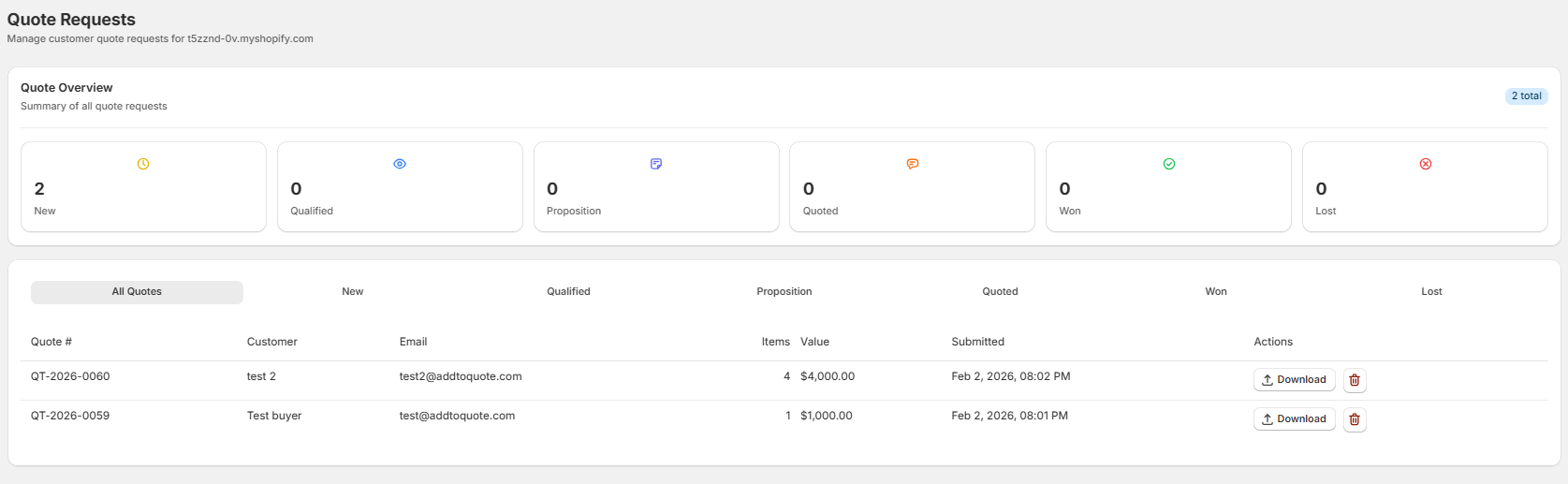
The fix: A quote button on your product pages captures requests the moment a buyer is interested. Instead of composing an email, the customer fills out a quick form with the products they want and their quantities. The request goes straight into a CRM pipeline where you can track it from first contact to closed deal. Read our full B2B quote management guide for a deeper look at building a quote workflow that actually converts.
Sign 2: Your Products Have Variable Pricing
The symptom: You cannot put a single price on your products because the final number depends on quantity, customization, the customer relationship, or the scope of the project. You might sell industrial supplies where 10 units cost $50 each but 1,000 units cost $28 each. Or you sell custom furniture where dimensions and materials change the price entirely.
Why it matters: Displaying a fixed retail price on products with variable pricing creates problems in both directions. If the displayed price is your highest tier, B2B buyers assume you are too expensive and leave without inquiring. If the displayed price is your lowest tier, customers expect that rate regardless of their order size, and you spend time explaining why their quote is higher than the listed price.
Variable pricing also applies to businesses that must comply with Minimum Advertised Price (MAP) policies. Manufacturers often prohibit retailers from displaying prices below a certain threshold. A quote button lets you negotiate below MAP without violating your agreement because the price is never publicly displayed.
The fix: Replace visible prices with a "Request a Quote" button. Customers specify their requirements — quantity, customization, timeline — and you respond with accurate, personalized pricing. Learn how to hide prices on Shopify to see three methods compared side by side.
Sign 3: You Sell to Both B2C and B2B Customers
The symptom: Your Shopify store serves individual retail customers and wholesale buyers, but both groups go through the same checkout flow. Retail customers buy one or two items at listed prices. Wholesale buyers want to order hundreds of units at negotiated rates — but your store does not give them a way to ask.
Why it matters: B2B buyers have fundamentally different expectations from retail shoppers. They expect to negotiate. They order in bulk. They need invoicing and net payment terms (Net 30, Net 60). They often require approval from multiple stakeholders before purchasing. Forcing a wholesale buyer through a retail checkout — add to cart, enter credit card, pay full price — feels wrong to them. Many will leave your store and find a competitor who treats them like a business customer.
The challenge is that you cannot just remove the checkout for everyone. Your retail customers are happy buying at listed prices. You need both paths: standard checkout for B2C and a quote workflow for B2B.
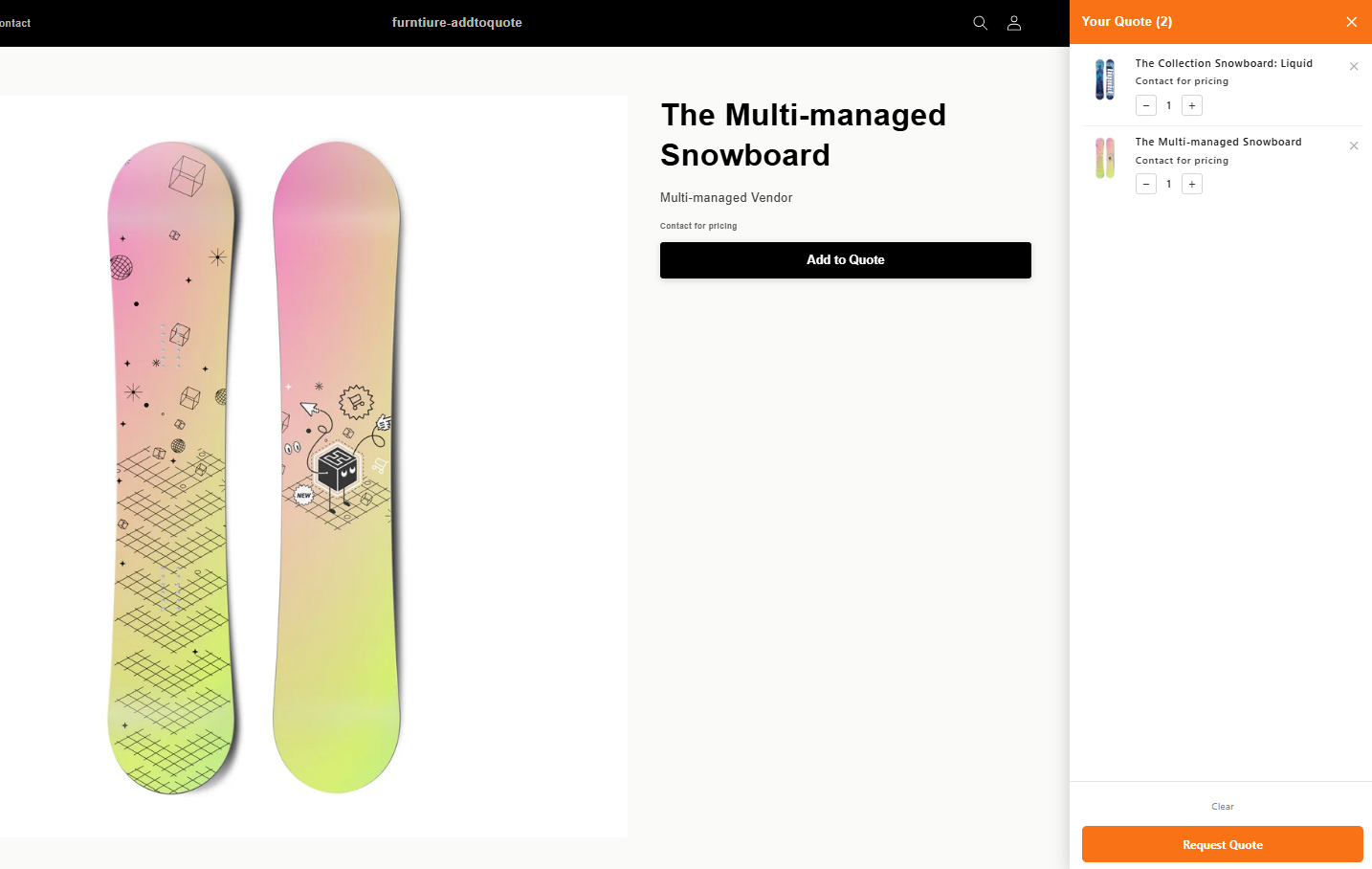
The fix: A quote app adds that B2B path without disrupting your retail flow. With AddToQuote in store-wide mode, the quote button replaces Add to Cart on all product pages, creating a consistent quoting experience for every visitor. This works on any Shopify plan — you do not need Shopify Plus. See our Shopify B2B vs Plus comparison to understand which approach fits your business.
Sign 4: Your Average Order Value Could Be Higher
The symptom: Customers buy from your store, but in small quantities. You sell products that lend themselves to bulk purchasing — office supplies, packaging materials, components, ingredients — yet most orders are for single units or small packs. You know customers could order more if the pricing made sense for larger quantities.
Why it matters: The standard Add to Cart button does not encourage negotiation or volume purchasing. A buyer who might order 1,000 units at a 15% discount instead orders 10 at full price because there is no mechanism to ask for better rates. Worse, that same buyer might find a competitor who actively offers volume pricing and take their entire business there.
Quote workflows create natural opportunities to increase order value. When a customer requests a quote for 100 units, your sales team can respond with tiered options: "100 units at $45 each, 250 units at $38 each, or 500 units at $32 each." This is upselling built into the process, not an awkward sales pitch. The customer asked for pricing, and you are giving them options that reward larger commitments.
The fix: Replace the standard checkout with a quote flow that lets customers specify their desired quantities and opens the door to volume pricing conversations. For proven strategies on turning quote requests into larger orders, read our guide on 7 ways to convert B2B quotes into sales.
Sign 5: Competitors Offer Quotes and You Don't
The symptom: You are losing deals to competitors who have "Request a Quote" functionality on their stores. B2B buyers tell you they went with another supplier, or you notice competitors in your niche prominently featuring quote buttons on their product pages.
Why it matters: B2B buyers shop around before committing to a supplier. They visit multiple stores, compare capabilities, and choose the vendor that makes purchasing easiest. If your competitor lets a buyer request a quote in 30 seconds and you require them to send an email and wait for a response, the competitor wins. The buyer has already moved forward with someone else by the time you reply.
This is the first-responder advantage in B2B sales. The supplier who makes it easiest to start a conversation captures the deal. A structured quote form on your product pages tells buyers: "We understand B2B purchasing. Tell us what you need and we will respond quickly." An email address on your contact page tells them: "Figure it out yourself."
The fix: Level the playing field. Add quote functionality that matches or exceeds what your competitors offer. The table stakes are a quote button, a form for capturing requirements, and timely responses. Where you can pull ahead is with features like a CRM pipeline for tracking every quote, branded PDF proposals, and automated follow-up notifications so no lead slips through the cracks.
What a Quote App Actually Does
If you recognized your store in two or more of those signs, here is what a modern Shopify quote app handles for you — end to end.
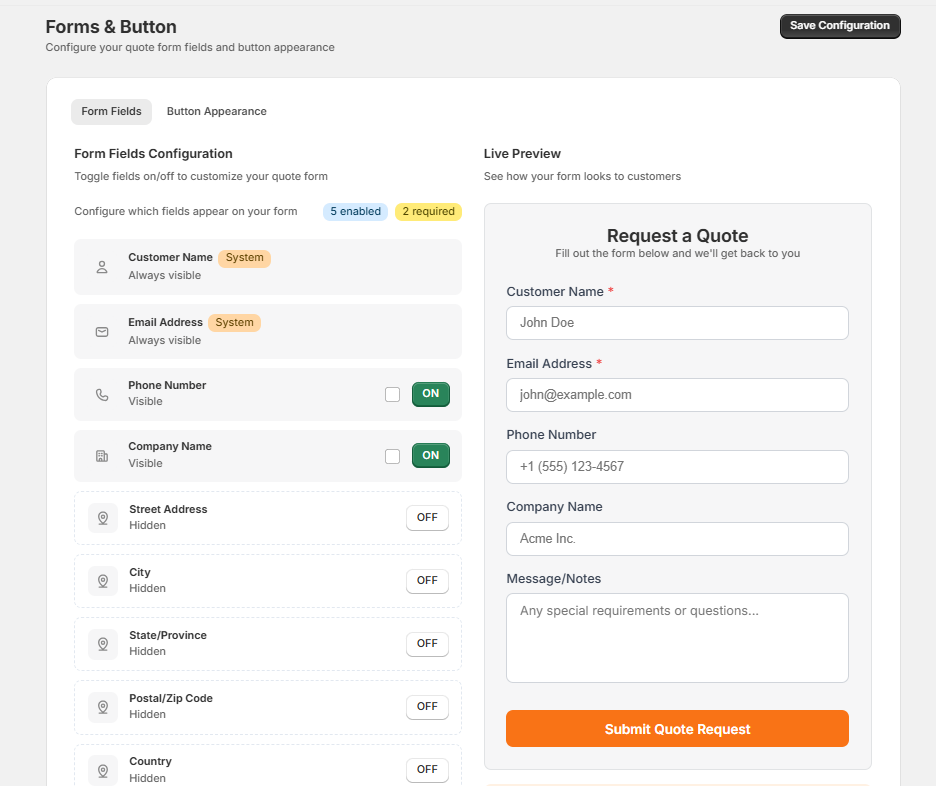
1. Quote request form. A customizable form replaces the standard Add to Cart button on your product pages. Customers browse your catalog, add items to a quote cart, and submit a request with their contact details and any special requirements. The form fields are fully configurable — you decide what information you need from buyers.
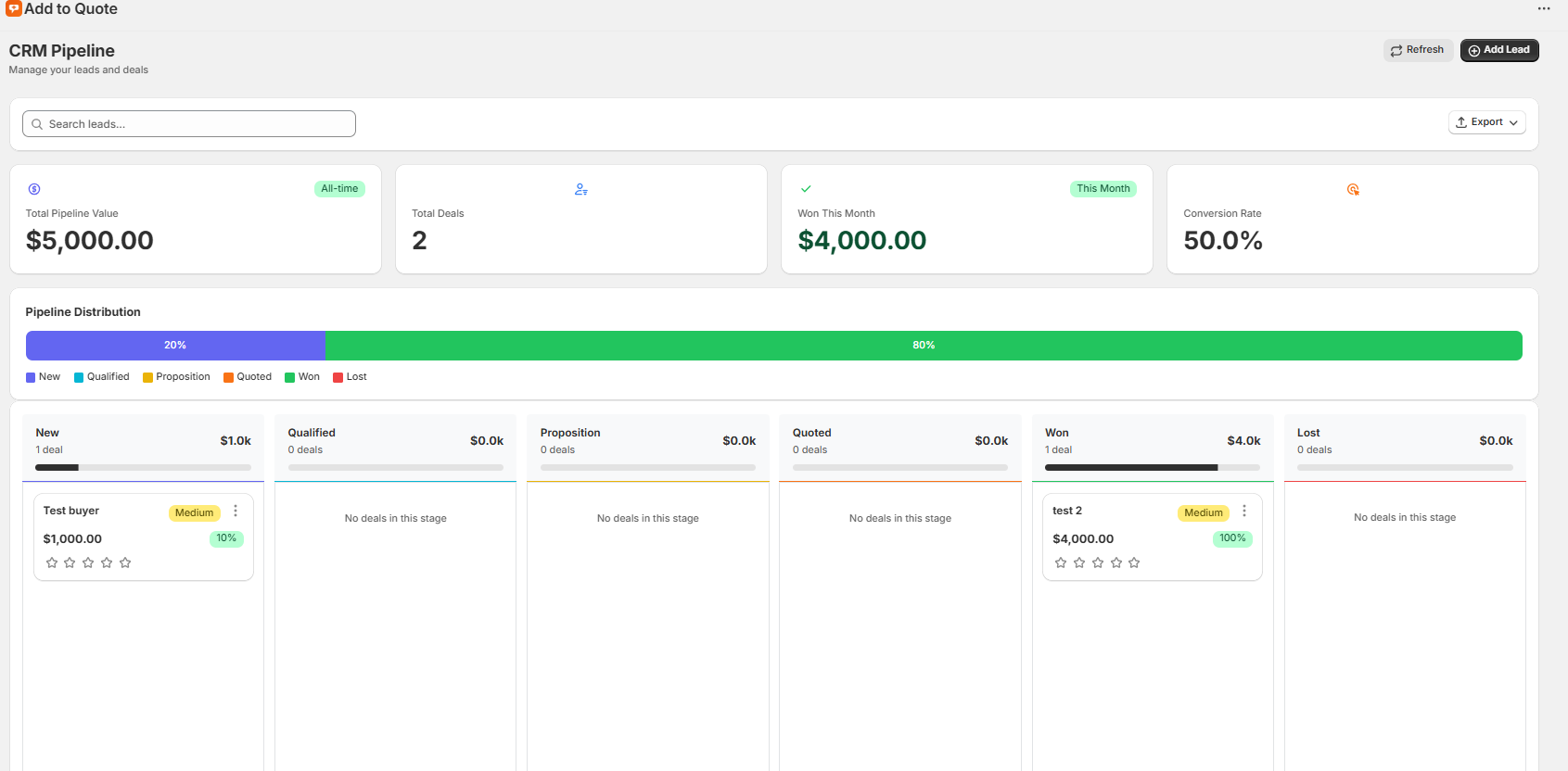
2. CRM pipeline. Every incoming quote lands in a visual pipeline with stages like New, Qualified, Proposition, Quoted, Won, and Lost. Your team can see at a glance how many quotes are active, which ones need attention, and where deals are stalling. No more digging through email to find the status of a request.
3. Custom pricing and PDF quotes. Review the requested products, adjust quantities or pricing, and generate a branded PDF quote with your logo, payment terms, and line item details. Send it directly to the customer via email. The customer receives a professional proposal instead of a plain-text email with prices listed in bullet points.
4. Draft order creation. When a customer accepts your quote, you convert it to a Shopify draft order with one click using the "Create Invoice" button. Every product, price, and customer detail transfers automatically — no manual re-entry, no errors. Learn how to convert quotes to draft orders for the full workflow.
The entire system runs through Shopify theme app extensions, which means it installs without modifying your theme code and loads asynchronously so it does not slow down your storefront.
The Cost of Waiting
Every month without a quote app is a month of lost opportunities. Consider a store that receives just 10 quote-worthy inquiries per month via email and converts 20% of them. That is 2 deals. With a structured quote system that improves response time, provides professional PDF proposals, and includes automated follow-ups, conversion rates typically improve to 35-40%. That is 4 deals from the same 10 inquiries — double the revenue without any increase in traffic or marketing spend.
The math gets more compelling at scale. A store with 50 monthly inquiries improving from 20% to 35% conversion gains 7.5 additional deals per month. At an average B2B order value of $2,000, that is $15,000 in recovered monthly revenue.
Beyond closed deals, a quote app gives you pipeline visibility. You can see which products generate the most quote requests, which customers are repeat buyers, and where in the process deals fall apart. This data does not exist when quotes live in email threads. Shopify's B2B documentation covers the broader B2B toolkit, but for quoting specifically, a dedicated app fills the gap that Shopify's native features do not cover unless you are on Plus.
How to Get Started
If two or more of these signs apply to your store, here is how to add quoting in four steps:
- Install AddToQuote from AddToQuote on the Shopify App Store. The app includes a 14-day free trial with full access to every feature. No credit card required.
- Enable the app embed in your Theme Editor. This activates the quote cart icon and global functionality across your store.
- Add the quote button block to your product template in Theme Editor. The button replaces Add to Cart on all product pages automatically.
- Start receiving and managing quotes through the CRM pipeline. Set up email notifications so your team never misses a new request.
The entire setup takes about five minutes and requires zero code changes or developer assistance.
Frequently Asked Questions
Do I need Shopify Plus to use a quote app?
No. AddToQuote works on any Shopify plan including Basic, Standard, and Advanced. You do not need Shopify Plus to add quote functionality, hide prices, or manage quotes with a CRM pipeline.
Will a quote app slow down my Shopify store?
No. AddToQuote uses Shopify theme app extensions, which load asynchronously and do not block your storefront rendering. The app does not modify your theme code or add heavy scripts to every page.
Can I still keep the Add to Cart button alongside the quote button?
AddToQuote operates in store-wide mode where the quote button replaces Add to Cart on all product pages. This is designed for merchants who want every customer to go through the quoting workflow. Retail and wholesale paths are handled through the quote flow itself.
How long does it take to set up a quote app on Shopify?
About 5 minutes. Install the app, enable the app embed in your Theme Editor, add the quote button block to your product template, and you are live. No code changes or developer assistance required.
What happens when a customer submits a quote request?
The quote appears in your CRM pipeline as a new lead. You can review the requested products and quantities, set custom pricing, generate a branded PDF quote, and send it to the customer via email. When the customer accepts, you convert it to a Shopify draft order with one click.
Does AddToQuote work with my Shopify theme?
AddToQuote works with any Shopify 2.0 theme, which includes every theme published since 2021. The app uses over 20 built-in CSS selectors to detect price elements across popular themes like Dawn, Sense, and Craft. For non-standard themes, you can add custom CSS selectors in the app settings.
Is there a free trial?
Yes. AddToQuote includes a 14-day free trial with full access to all features including CRM pipeline, PDF quotes, price hiding, and multi-channel notifications. No credit card is required to start.
Bottom Line
If you are handling B2B quote requests through email, displaying fixed prices on products with variable pricing, or watching competitors capture deals with better quoting tools — those are not minor inconveniences. They are revenue leaks that grow larger every month.
A quote app turns your Shopify store from a retail-only storefront into a B2B sales channel with structured workflows, professional proposals, and full pipeline visibility. The five signs above are not theoretical. They are the exact patterns merchants describe before switching from manual quoting to a dedicated system.
Ready to see how it works for your store? Book a free demo and we will walk through the full quoting workflow with your products.
Mohammad Mahdawi
Founder, AddToQuote
Founder of AddToQuote. 15+ years in B2B and B2C e-commerce, building tools that help merchants quote and close more deals.


