
Integrating your B2B quotes with external systems should not require manual data entry or custom API integrations. Your quotes live in Shopify, your customer records in Salesforce, your inventory in an ERP, and your analytics in Segment. Without real-time integration, someone on your team is copying data between platforms — creating errors, delays, and incomplete customer views. AddToQuote's outbound webhooks solve this by sending HMAC-signed HTTP notifications to your external systems whenever quote events occur. You get instant data sync without writing custom API polling logic or managing batch exports. This guide covers everything you need to integrate your B2B quote workflow with CRMs, ERPs, analytics platforms, and custom applications. For broader context on B2B quote management workflows, see our complete guide for Shopify wholesalers.
Why Integrate Quotes with External Systems
Data silos create operational friction. When your quote data lives exclusively in Shopify, your sales team cannot see quote activity in Salesforce, your finance team cannot track conversion metrics in your analytics dashboard, and your warehouse cannot prepare inventory based on incoming quote requests. Manual data transfer introduces errors — mistyped customer emails, wrong quantities, outdated pricing. By the time someone copies a converted quote into your ERP, the customer may have already contacted support asking about order status.
Real-time webhook integration eliminates these gaps. When a customer submits a quote request at 2 PM, your CRM creates a lead record within seconds. When your sales rep converts that quote to a draft order, your ERP receives the line items immediately. Your analytics platform tracks the entire funnel from quote request to invoice payment without manual event logging. You get a unified view of the customer journey across all your business systems.
The alternative — batch exports or API polling — introduces lag and complexity. Scheduled exports run hourly or daily, creating stale data windows. API polling requires you to repeatedly query for new quotes, wasting server resources and API rate limits. Webhooks push data to you instantly when events happen, with built-in retry logic and delivery logging.
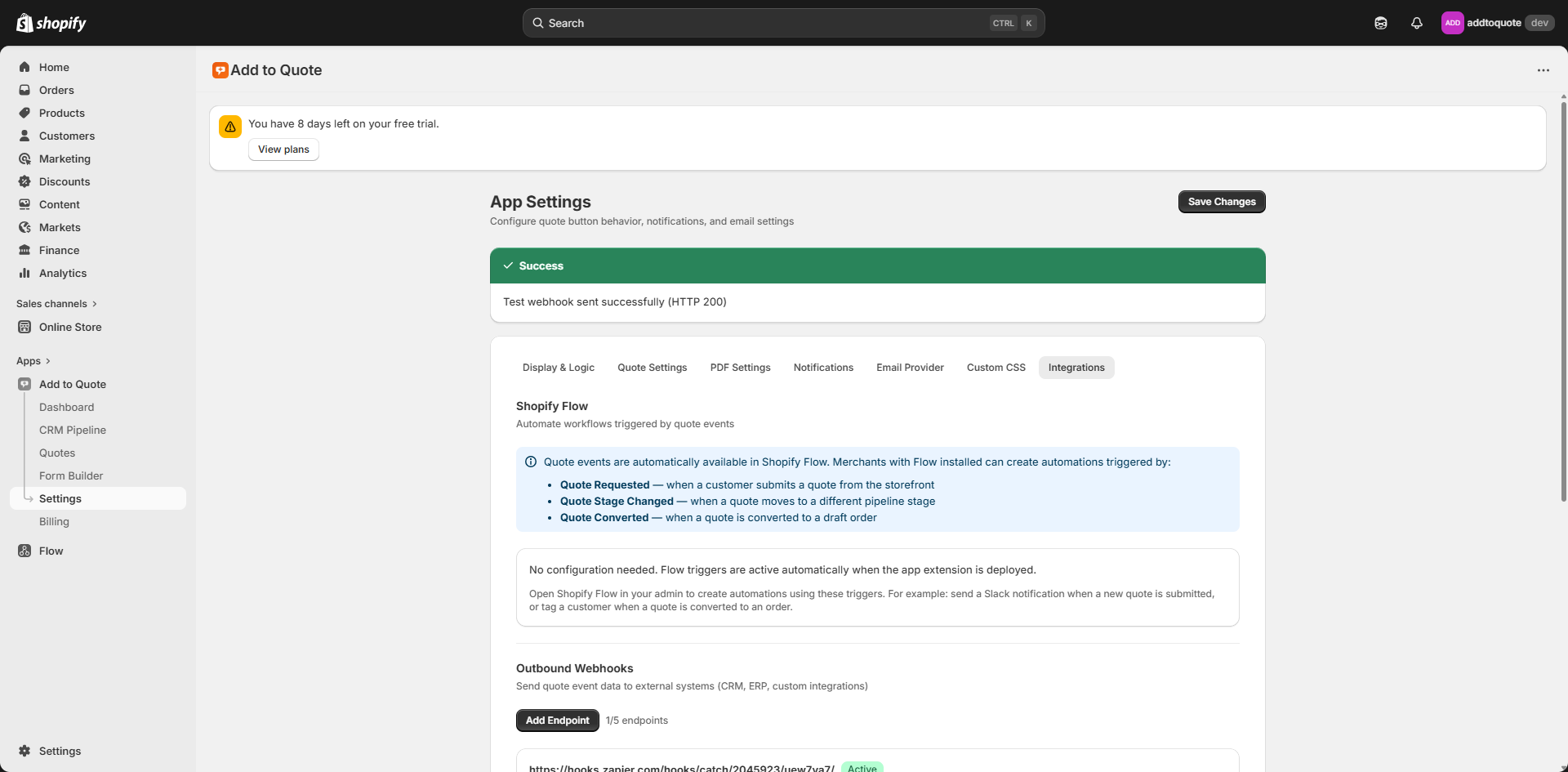
External systems expect real-time notifications to trigger downstream workflows. Your ERP needs immediate notification of quote conversions to reserve inventory. Your analytics platform needs quote stage changes to track sales velocity. Your customer success tool needs assignment events to route follow-ups. Webhooks are the standard pattern for this kind of event-driven integration — learn more at webhooks.fyi.
How Outbound Webhooks Work
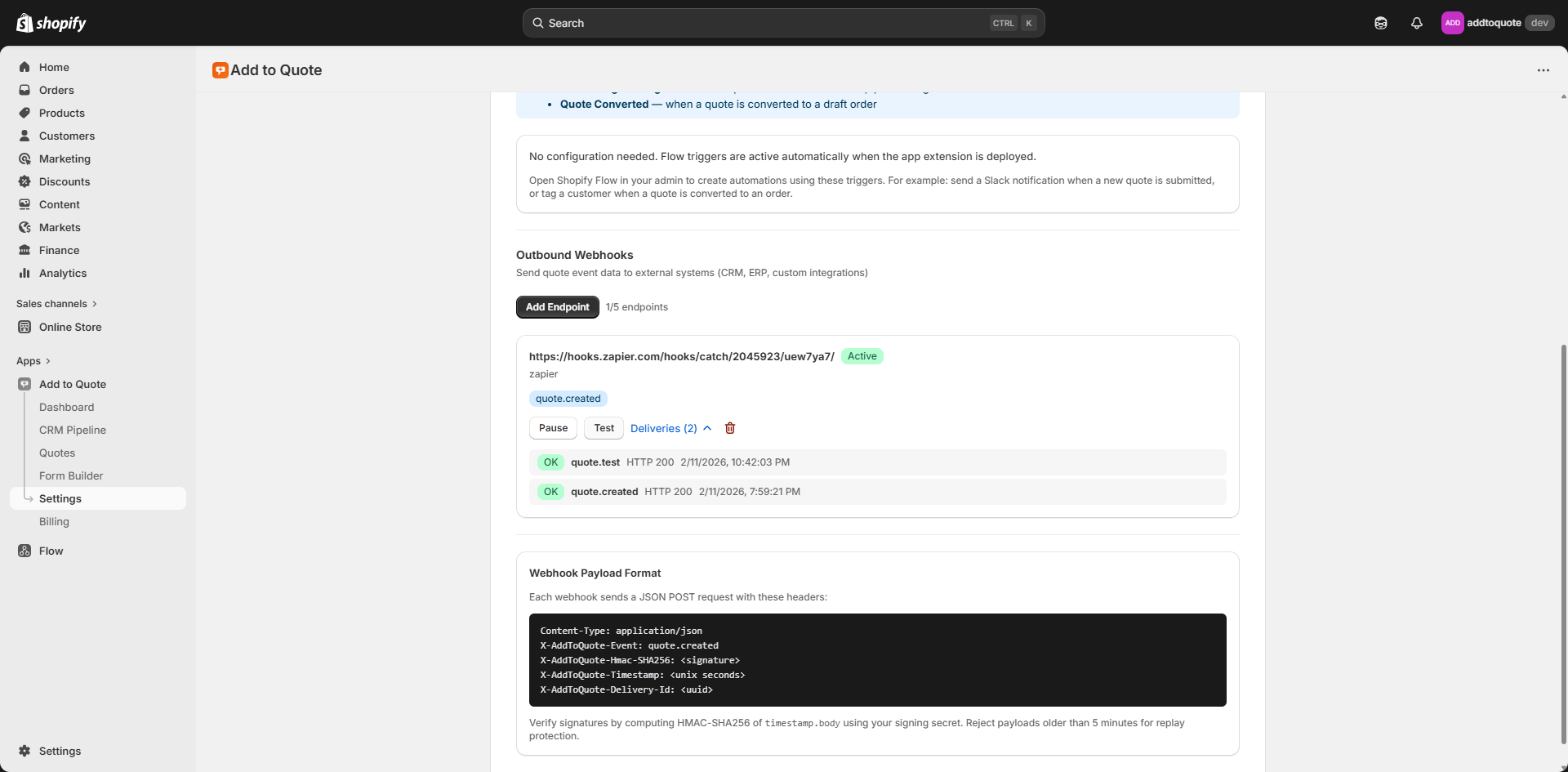
When a quote event occurs in AddToQuote, the webhook engine validates your configured endpoint, serializes the event payload to JSON, computes an HMAC-SHA256 signature using your endpoint's secret key, and sends an HTTP POST request to your URL. Your server validates the signature, processes the payload, and returns an HTTP 200 status code. If your endpoint returns an error or times out, AddToQuote retries up to three times with exponential backoff. Every delivery attempt is logged with status code, response time, and error details.
Security is enforced at multiple layers. All webhook endpoints must use HTTPS — HTTP URLs are rejected during setup. Each endpoint gets a unique signing secret that AddToQuote uses to generate the X-AddToQuote-Signature header. Your server recomputes the HMAC signature from the raw request body and compares it with the header value. If they do not match, reject the request with HTTP 401. This prevents spoofed webhook requests from unauthorized sources.
SSRF protection blocks internal network targets. AddToQuote validates that your endpoint URL resolves to a public IP address, rejecting localhost, private IP ranges (10.x.x.x, 192.168.x.x, 172.16-31.x.x), link-local addresses, and cloud metadata endpoints. This prevents attackers from using webhook configuration as a vector to probe your internal infrastructure. The engine also disables HTTP redirects to prevent redirect-based SSRF bypasses.
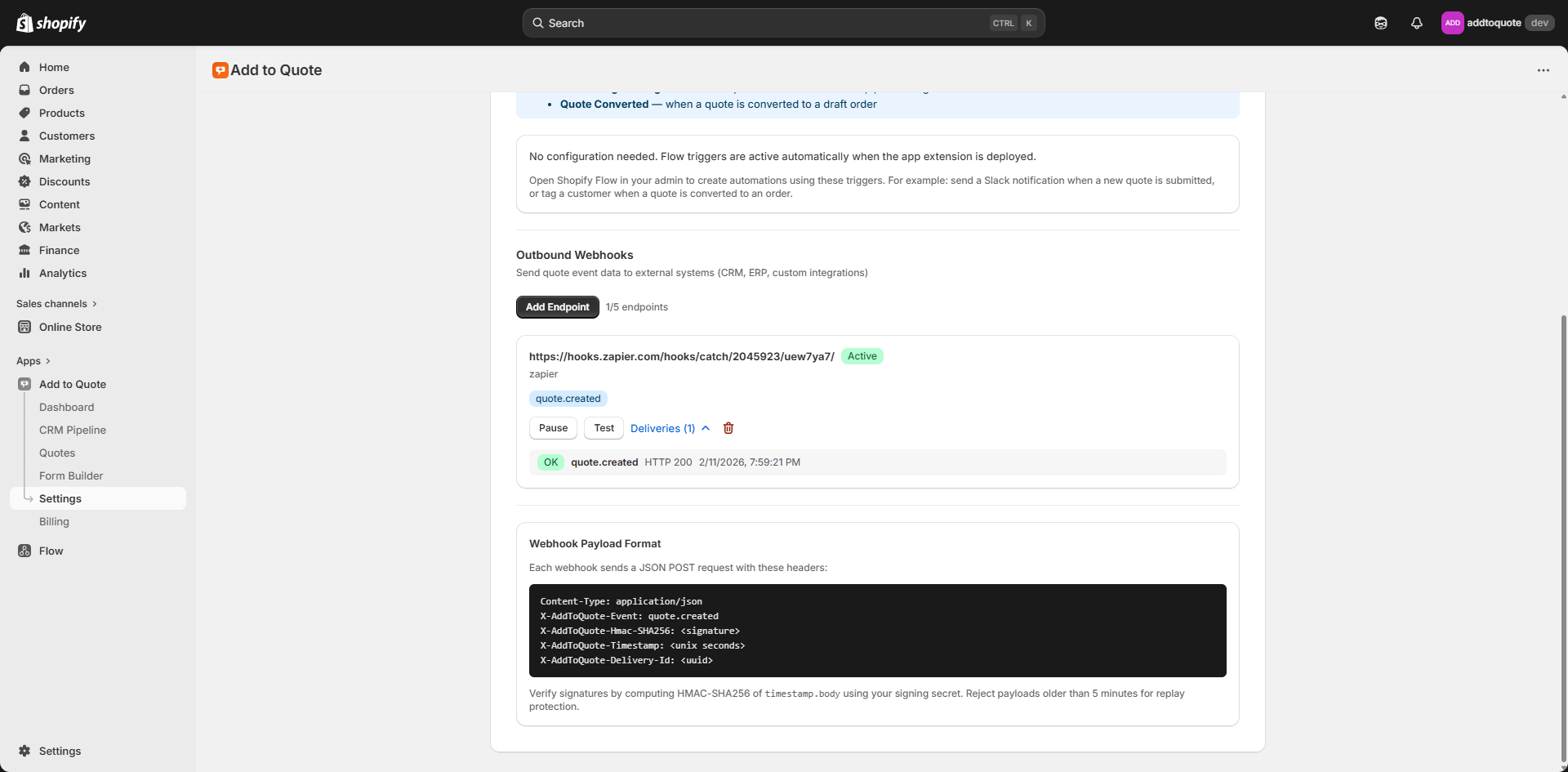
Retry logic handles transient failures gracefully. If your endpoint returns HTTP 500 or times out after ten seconds, AddToQuote waits one second and retries. If the second attempt fails, it waits four seconds. The third attempt waits sixteen seconds. After three failures, the delivery is marked as failed and appears in your delivery log. This exponential backoff prevents retry storms while giving your system time to recover from temporary issues.
Delivery logs provide full observability. For every webhook delivery attempt, AddToQuote records the timestamp, HTTP status code, response time in milliseconds, and any error messages. You can filter logs by endpoint, event type, date range, and delivery status. This makes debugging straightforward — if quotes are not appearing in your CRM, check the delivery log to see if requests are failing with 401 (signature validation error) or 500 (your server error).
Available Webhook Events
AddToQuote dispatches webhooks for eight event types covering the full quote lifecycle. Each event payload includes the quote ID, shop domain, event timestamp, and event-specific data. You configure which events each endpoint receives — a CRM integration might only need quote.created and quote.converted, while an analytics platform might subscribe to all events.
quote.created
Fires when a customer submits a quote request through your storefront. The payload includes the full quote details: an array of line items with product titles, variant names, quantities, requested prices, and product images; customer contact information (name, email, phone); shipping address (street, city, province, zip, country); an array of uploaded files with filenames, URLs, sizes, and MIME types; and the customer's message. Use this event to create leads in your CRM, trigger sales team notifications, or log quote requests in your analytics platform.
quote.stage_changed
Fires when a quote moves between pipeline stages in your CRM workflow. The payload includes the quote ID, quote number, old stage name, new stage name, and timestamp. Common integrations use this to update opportunity stages in Salesforce, track conversion funnel metrics, or trigger automated follow-ups when quotes move to specific stages like "Awaiting Customer Response" or "Ready to Convert."
quote.converted
Fires when your team converts a quote to a Shopify draft order. The payload includes the quote ID, draft order GID (Shopify's global ID format), draft order total amount, currency, and conversion timestamp. This is your trigger to create sales orders in an ERP, update CRM opportunities to "Closed Won," or track B2B revenue in analytics platforms. The draft order GID lets you query additional details via Shopify's Admin API if needed.
quote.assigned
Fires when a quote is assigned to a team member for follow-up. The payload includes the quote ID, assignee's name, assignee's email address, and assignment timestamp. Integrations typically use this to route tasks in project management tools, send Slack notifications to assigned reps, or update CRM ownership fields.
quote.note_added
Fires when your team adds a note to a quote record. The payload includes the quote ID, note content, author name, and timestamp. Use this to sync internal communication to CRM activity logs, create audit trails in compliance systems, or trigger notifications when specific keywords appear in notes.
quote.invoice_sent
Fires when your team sends a draft order invoice to the customer via Shopify. The payload includes the quote ID, draft order GID, recipient email address, and sent timestamp. This event helps you track quote-to-invoice conversion timing, update payment status in accounting systems, or trigger automated invoice reminders.
quote.deleted
Fires when a quote is permanently deleted from AddToQuote. The payload includes the quote ID, quote number, deletion timestamp, and the user who performed the deletion. Use this to archive records in external systems, maintain audit logs for compliance, or clean up orphaned records in synced platforms.
quote.test
A special event type that sends realistic dummy data to your endpoint without affecting production quotes. The payload structure matches quote.created but uses fictional customer names, products, and addresses. Send this event from the AddToQuote dashboard to verify your endpoint is reachable, signature validation works correctly, and your integration processes payloads as expected — all without creating real quote records.
Setting Up Webhook Endpoints
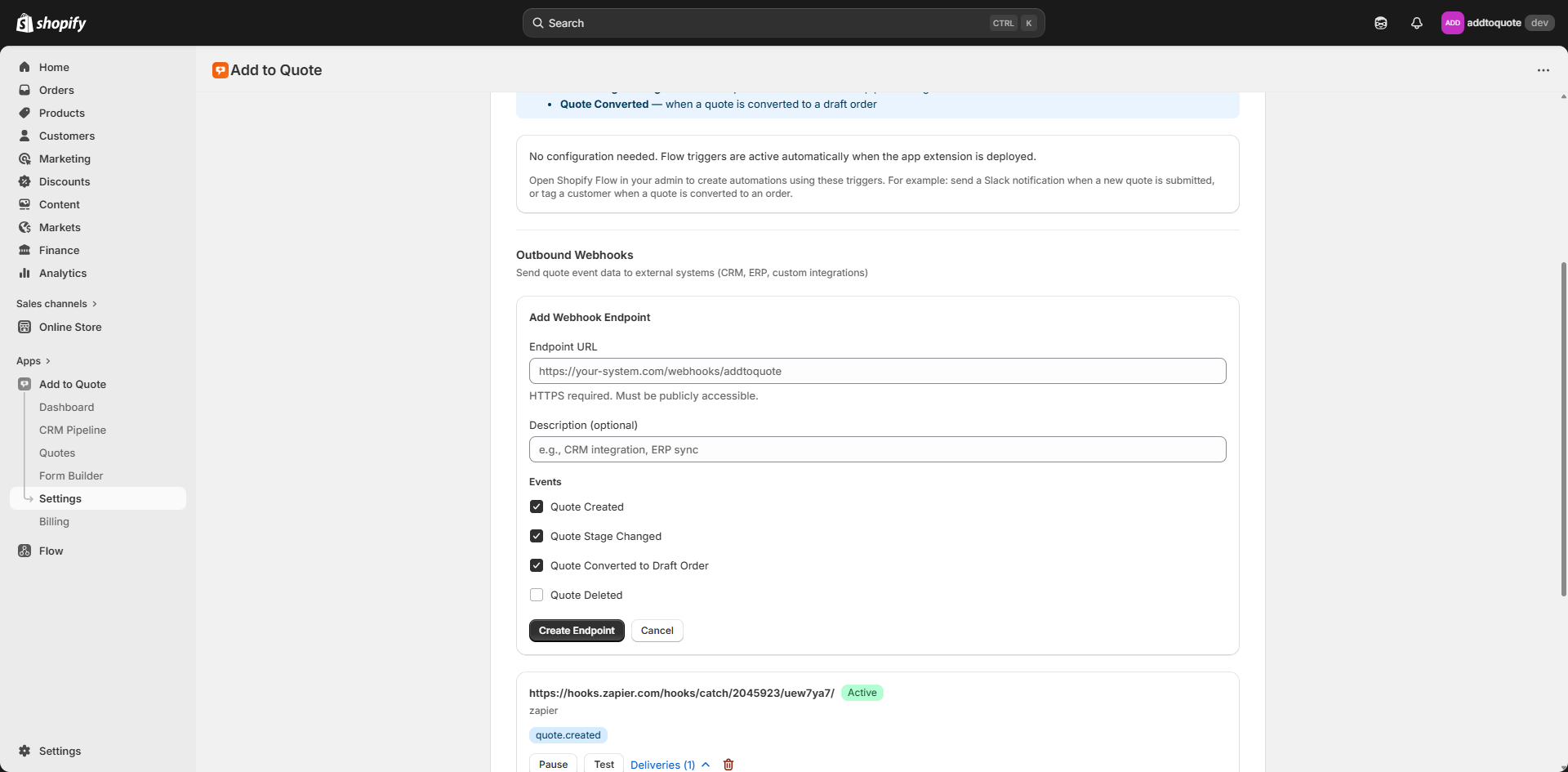
Configuring outbound webhooks requires four steps: adding your endpoint in AddToQuote, implementing HMAC validation on your server, testing with the quote.test event, and selecting which events to receive.
Step 1: Add Your Endpoint in AddToQuote. Navigate to Settings → Integrations in the AddToQuote dashboard. Click "Add Webhook Endpoint" and enter your HTTPS URL — HTTP URLs are rejected. AddToQuote generates a unique signing secret and displays it once. Copy this secret immediately and store it in your server's environment variables. The secret is used to generate the HMAC signature for every webhook delivery. You can regenerate the secret later if it is compromised, but all in-flight webhooks will fail validation until you update your server with the new secret.
Step 2: Implement HMAC Validation. Your server must validate the X-AddToQuote-Signature header before processing any webhook payload. Compute an HMAC-SHA256 hash of the raw request body using your signing secret, then compare it with the header value using a timing-safe comparison function to prevent timing attacks. Here is a Node.js example:
```javascript
const crypto = require('crypto');
function verifyWebhook(body, signature, secret) {
const hmac = crypto.createHmac('sha256', secret);
const digest = hmac.update(body, 'utf8').digest('hex');
return crypto.timingSafeEqual(
Buffer.from(signature),
Buffer.from(digest)
);
}
```
Use the raw request body for signature validation — do not parse it to JSON first. Most frameworks consume the body stream when parsing, which breaks signature validation.
Step 3: Test Your Endpoint. Once your endpoint is deployed and reachable over HTTPS, send a test event from AddToQuote. Click the "Send Test Event" button next to your endpoint in Settings → Integrations. AddToQuote dispatches a quote.test webhook with realistic dummy data. Check your server logs to verify the request arrived, signature validation passed, and your handler processed the payload. The delivery log in AddToQuote shows the HTTP status code your endpoint returned — 200 means success.
Step 4: Select Event Subscriptions. Each endpoint can subscribe to specific event types. Enable only the events your integration needs — subscribing to all events when you only process quote.created wastes bandwidth and clutters logs. Use granular subscriptions for different endpoints: your CRM endpoint subscribes to quote.created and quote.converted, your analytics endpoint subscribes to all stage changes, and your ERP endpoint only subscribes to quote.converted.
For production deployments, configure separate endpoints for staging and production environments. Use different signing secrets for each environment to prevent cross-environment replay attacks. Shopify's own webhook infrastructure follows similar patterns — see their webhook verification guide for additional security recommendations.
Common Integration Patterns
Real-world webhook integrations typically fall into four categories: CRM sync, analytics tracking, ERP workflow automation, and multi-system routing. Each pattern solves specific operational challenges in B2B sales workflows.
Sync Quotes to Salesforce CRM
When quote.created fires, create a Lead record in Salesforce with the customer's contact information, quote line items stored in a custom object or as plain text, and the quote number as an external reference. When quote.stage_changed fires, update the corresponding Opportunity stage to match your AddToQuote pipeline stages. When quote.converted fires, update the Opportunity to "Closed Won" and attach the Shopify draft order ID as a reference for order tracking.
This pattern eliminates double data entry for sales reps and gives your entire organization visibility into the B2B sales pipeline. Marketing can measure lead source effectiveness, sales managers can forecast revenue from open quotes, and customer success can see the full relationship history before onboarding calls.
Push to Analytics (Segment/Mixpanel)
Track all quote events as custom events in your analytics platform. Send quote.created as a "Quote Requested" event with properties for total value, item count, and customer segment. Track quote.stage_changed as "Quote Stage Changed" to measure stage duration and identify bottlenecks. Log quote.converted as "Quote Converted" with revenue attribution. This builds a complete B2B funnel in your analytics dashboard — quote request volume, stage conversion rates, time-to-conversion, and average quote value.
Trigger ERP Workflow on Conversion
When quote.converted fires, create a sales order in your ERP system with the draft order GID as a reference, line items with SKUs and quantities, customer shipping address, and special instructions from the quote notes. This lets your warehouse team start inventory allocation and picking before the customer pays the invoice. For custom manufacturing workflows, the conversion event can trigger production scheduling, material procurement, or capacity planning.
Multi-System Routing by Event Type
Use a middleware layer like Zapier, Make (formerly Integromat), or a custom AWS Lambda function to route different webhook events to different destinations. Quote.created goes to your CRM and analytics platform. Quote.converted goes to your ERP and accounting system. Quote.assigned goes to Slack for real-time team notifications. Quote.invoice_sent goes to your customer success platform to trigger post-sale onboarding. This hub-and-spoke pattern centralizes webhook authentication and retry logic in one place while distributing events to specialized systems.
Webhook Delivery Monitoring
Every webhook delivery attempt is logged with a timestamp, target URL, event type, HTTP status code, response time, and any error messages. Access delivery logs in Settings → Integrations by clicking "View Logs" next to any endpoint. Filter by date range, event type, or delivery status (success, failed, pending retry) to diagnose integration issues.
Common failure patterns reveal specific problems. HTTP 401 responses indicate signature validation failures — verify your signing secret matches the one displayed in AddToQuote, and confirm you are computing the HMAC from the raw request body before parsing JSON. HTTP 500 errors mean your server encountered an exception while processing the webhook — check your application logs for stack traces. Timeout errors (no response within ten seconds) suggest your endpoint is performing slow synchronous operations — move heavy processing to a background job queue and return HTTP 200 immediately after queuing.
Monitor delivery success rates over time to detect integration degradation. A sudden spike in 500 errors might indicate a recent code deployment broke your webhook handler. Increasing timeout rates could signal database slowness or third-party API latency in your processing pipeline. AddToQuote's delivery logs give you the observability to maintain reliable integrations even as your infrastructure evolves.
Security Best Practices
Webhook endpoints are publicly accessible URLs that receive data pushed from external systems. Follow these seven security rules to prevent unauthorized access, data tampering, and abuse.
- Always validate the HMAC signature before processing. Never trust the webhook payload until you have verified the X-AddToQuote-Signature header. Compute the HMAC-SHA256 hash of the raw request body using your signing secret and compare it with the header using a timing-safe equality function.
- Use HTTPS endpoints only. AddToQuote enforces this during endpoint configuration, but ensure your server's TLS certificate is valid and up to date. Expired or self-signed certificates will cause delivery failures.
- Store your signing secret securely. Never hardcode secrets in application code or commit them to version control. Use environment variables or secret management services like AWS Secrets Manager or HashiCorp Vault.
- Return HTTP 200 quickly, then process asynchronously. Your webhook handler should acknowledge receipt within ten seconds to prevent timeouts. Validate the signature, parse the JSON payload, enqueue a background job, and return 200. Perform expensive operations in a worker process.
- Implement idempotency. AddToQuote includes a unique event ID in every webhook payload. Store processed event IDs in your database and skip processing if you have already handled an event. This prevents duplicate records if AddToQuote retries a delivery.
- Log all webhook deliveries for audit trails. Record the event ID, event type, timestamp, processing status, and any errors in your application logs. This creates a forensic trail for debugging and compliance audits.
- Rate-limit your endpoint to handle bursts. If a merchant processes many quotes simultaneously, your endpoint receives a burst of requests. Implement rate limiting and queue-based processing to smooth traffic spikes. Return HTTP 429 (Too Many Requests) if your queue is full — AddToQuote will retry with exponential backoff.
Outbound Webhooks vs Shopify Flow
AddToQuote offers both outbound webhooks and Shopify Flow integrations for automating quote workflows. They serve different use cases with different technical requirements.
| Feature | Outbound Webhooks | Shopify Flow |
|---|---|---|
| Target | External systems (CRM, ERP, analytics) | Shopify ecosystem |
| Authentication | HMAC-SHA256 | Not applicable |
| Setup complexity | Requires server-side code | No-code visual builder |
| Best for | Custom integrations | Internal Shopify automations |
Outbound webhooks work on any Shopify plan and target external systems outside the Shopify ecosystem. You write server-side code to receive HTTP POST requests, validate HMAC signatures, and integrate with your CRM, ERP, or analytics platform. Use webhooks when you need to integrate quotes with Salesforce, NetSuite, Segment, or proprietary internal tools.
Shopify Flow is a no-code automation builder available on Shopify Advanced and Plus plans. It runs entirely within Shopify's infrastructure and triggers actions on Shopify resources — tagging customers, sending emails, updating draft orders. For detailed Flow integration patterns, see our Shopify Flow automation guide.
Many merchants use both patterns together. Shopify Flow handles internal automations like customer tagging and draft order updates. Outbound webhooks sync quote data to external systems like CRMs and ERPs. This hybrid approach maximizes automation coverage across your entire B2B tech stack.
Frequently Asked Questions
What are outbound webhooks in AddToQuote?
Outbound webhooks are HMAC-signed HTTP POST requests that AddToQuote sends to your configured endpoints whenever quote events occur. Each webhook payload contains JSON data describing the event (quote created, stage changed, converted to draft order, etc.) along with relevant quote details. You write server-side code to receive these requests, validate the signature, and integrate the data with external systems like CRMs, ERPs, or analytics platforms.
How do I verify that webhook requests are legitimate?
Every webhook includes an X-AddToQuote-Signature header containing an HMAC-SHA256 hash of the request body. Compute the HMAC hash of the raw request body using your endpoint's signing secret and compare it with the header value using a timing-safe comparison function. Reject requests with mismatched signatures before processing. This cryptographic signature proves the request originated from AddToQuote and has not been tampered with.
What happens if my webhook endpoint is down?
AddToQuote retries failed deliveries up to three times with exponential backoff (1 second, 4 seconds, 16 seconds). If all retries fail, the delivery is marked as failed in your delivery logs. You can view failed deliveries in Settings → Integrations and investigate the root cause. For production systems, implement redundancy and health checks to minimize downtime.
How many webhook endpoints can I configure?
Each AddToQuote account can configure up to five webhook endpoints. This lets you send different event types to different systems — one endpoint for your CRM, another for your ERP, a third for analytics, and two for staging/development environments. Each endpoint has its own signing secret and event subscriptions.
Can I test my webhook endpoint before going live?
Yes. After adding an endpoint in Settings → Integrations, click "Send Test Event" to dispatch a quote.test webhook with realistic dummy data. This verifies your endpoint is reachable over HTTPS, signature validation works correctly, and your handler processes payloads without errors. The delivery log shows the HTTP status code and response time, so you can confirm everything works before enabling production event subscriptions.
Do I need Shopify Plus to use outbound webhooks?
No. Outbound webhooks work on any Shopify plan — Basic, Shopify, Advanced, or Plus. Unlike Shopify Flow (which requires Advanced or Plus), webhooks are available to all AddToQuote users. The only requirement is an HTTPS endpoint on your server to receive webhook deliveries.
Bottom Line
Outbound webhooks eliminate manual data entry and enable real-time integration between your B2B quote workflow and the rest of your business systems. With HMAC-signed security, automatic retries, and comprehensive delivery logging, you get reliable event notifications without building custom API polling logic. Whether you are syncing quotes to Salesforce, tracking conversion metrics in Segment, or triggering ERP workflows on draft order creation, webhooks give you the flexibility to integrate AddToQuote with any system that accepts HTTP requests. Install AddToQuote from the Shopify App Store to start building integrations today, or book a free demo to see webhook-powered workflows in action.
Mohammad Mahdawi
Founder, AddToQuote
Founder of AddToQuote. 15+ years in B2B and B2C e-commerce, building tools that help merchants quote and close more deals.


